As your resident TV mount expert with over 15 years in the trenches, I’ve seen countless setups, from grand home theaters to cozy bedroom nooks. When it comes to optimizing space and enhancing your viewing experience, a Small Tv Wall Mount is often the unsung hero. It’s not just about getting your TV off the stand; it’s about reclaiming your space, finding the perfect angle, and giving your room a sleek, modern edge. At Dikfu.com, we’re dedicated to helping you achieve that perfect setup with confidence, making complex technical details simple and actionable.
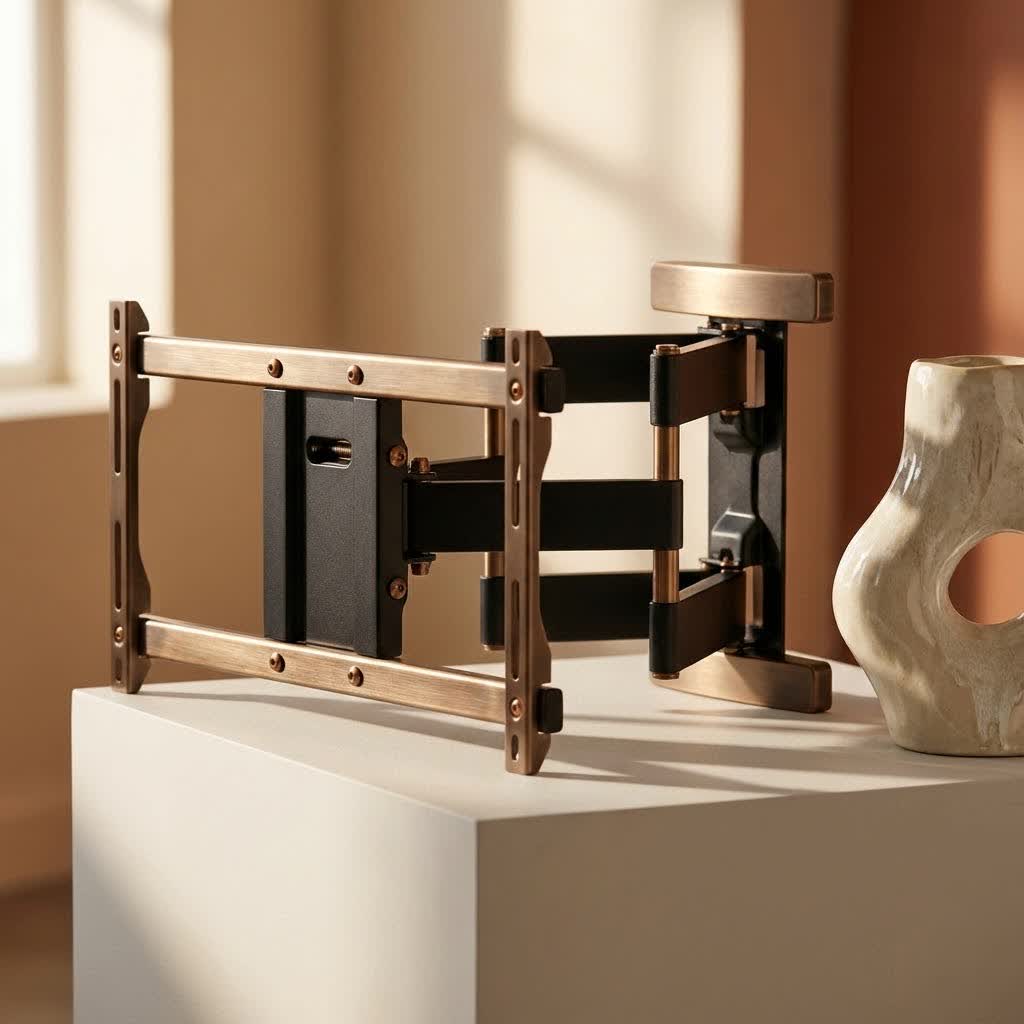
Gone are the days when a wall-mounted TV was a luxury reserved for large screens. Today, compact televisions benefit immensely from strategic placement, opening up possibilities for kitchens, home offices, bedrooms, and even small apartments. This guide will walk you through everything you need to know about choosing and installing the ideal small TV wall mount, ensuring safety, stability, and stunning aesthetics.
Why Choose a Small TV Wall Mount? Maximize Your Space, Elevate Your View
So, why bother with a wall mount for a smaller TV? The reasons are compelling, especially in today’s increasingly compact living spaces. A small TV wall mount offers significant advantages beyond just aesthetics.
First and foremost, it’s a game-changer for space-saving. Traditional TV stands, even for smaller sets, consume valuable floor or surface area. By mounting your TV, you free up that real estate, making your room feel larger, more open, and less cluttered. Imagine a tidy bedside table, a clear kitchen counter, or an organized desk – all thanks to your TV being up and out of the way.
Beyond space, wall mounts provide enhanced viewing flexibility. You can position your small TV at the optimal height to reduce neck strain, whether you’re watching from bed, cooking in the kitchen, or exercising in your home gym. This ergonomic benefit is crucial for comfort, especially during longer viewing sessions. Plus, with certain mount types, you can eliminate glare from windows or lights with a simple adjustment.
Finally, a mounted TV simply looks better. It creates a clean, minimalist aesthetic that integrates seamlessly into your decor. No more tangled cables or bulky furniture disrupting your room’s design. Your small TV becomes a part of the wall, a streamlined display rather than a separate piece of furniture.
Types of Small TV Wall Mounts: Finding Your Perfect Fit
The world of TV mounts offers a variety of options, each designed for different needs and preferences. For small TVs, understanding these types is key to making the right choice.
Fixed Mounts: The Low-Profile Champion
|
Our Picks for the Best TV Mount in 2026
As an Amazon Associate I earn from qualifying purchases.
|
||
| Num | Product | Action |
|---|---|---|
| 1 | Pipishell Full Motion TV Wall Mount for Echo Show 21/15 and 13-43 Inch Flat Curved Screen TVs & Monitors, Max VESA 200x200mm up to 44lbs, TV Mount Wall Bracket with Rotation Swivel Tilt Extension |

|
| 2 | USX Mount Full Motion TV Wall Mount for Most 42-90 inch Flat Screen/LED/4K, TV Mount Bracket Dual Swivel Articulating Tilt 6 Arms, Max 16\" Wood Studs, VESA 600x400mm, Holds up to 132lbs |
|
| 3 | monTEK Motorized Ceiling TV Mount for 43-86 Inch TVs, Heavy-Duty 121lbs (4X Load Tested), Off-Center VESA Compatible, Electric Flip Down with Remote/App/Voice Control, Fits Flat & Pitched Roof |
|
| 4 | Mounting Dream TV Wall Mount for Most 37-75 Inch TVs, Universal Tilt TV Mount Fit 16\", 18\", 24\" Stud with Loading Capacity 132lbs, Max Vesa 600 x 400mm, Low Profile Flat Wall Mount TV Bracket |
|
| 5 | Magnetic Monitor Wall Mount for Steel Surfaces, Fits 13 to 34 Inch Screens, Holds up to 22 lbs, VESA 75/100 Compatible Wall Mount for Computer and TV Monitor, No-Drill Installation with All Screws |
|
| 6 | Mounting Dream TV Wall Mount for 32-65 Inch Television,Mount with Swivel and Tilt, Full Motion Bracket with Articulating Dual Arms, Fits 16inch Studs, Max VESA 400X400 mm, 99lbs, MD2380 |
|
| 7 | MOUNTUP Full Motion TV Wall Mount for Most 26-60 Inch TVs, Max VESA 400x400mm Wall Mount TV Bracket with Swivel Tilting Extension Level Adjustment for LED LCD Flat Curved TVs Up to 77 LBS, MU0018 |
|
| 8 | Perlegear Full Motion TV Wall Mount for Most 42–86 inch Flat Curved TVs up to 132 lbs, 12″/16″ Wood Studs, Bracket with Articulating Arms, Swivel, Tool-Free Tilt, Max VESA 600x400mm PGLF12 |
|
| 9 | Amazon Basics Full Motion Articulating TV Wall Mount, with Swivel and Tilt, for 26\" to 55\" TVs and Flat Panels up to 80 Lbs, VESA Compatible, Black |
|
| 10 | USX MOUNT Full Motion TV Wall Mount for Most 32-70 inch TVs up to 99 lbs, Wall Mount Bracket with Dual Articulating Arms, Swivel, Tilt, Max VESA 400x400mm, TV Mount Fits 12”/16” Wood Studs |
|
Fixed wall mounts are the simplest and most cost-effective option. They hold your TV flat and flush against the wall, like a picture frame. The main benefit here is a super low-profile design, often extending just an inch or two from the wall. This creates a remarkably clean and integrated look, perfect for rooms where the TV’s position rarely changes.
“For a truly minimalist look in a guest room or kitchen, a fixed small TV wall mount is unbeatable,” says Dikfu.com’s lead installer, Alex Turner. “It virtually disappears into the wall, keeping the focus on your screen.”
However, the trade-off is a lack of adjustability. Once installed, your TV stays put, with no tilt, swivel, or extension. These mounts are ideal when your viewing spot is directly in front of the TV and glare isn’t an issue.
Tilting Mounts: Banish Glare, Find Comfort
Tilting mounts offer a step up in functionality. While still maintaining a relatively slim profile, they allow you to tilt your TV vertically, typically downwards. This feature is incredibly useful for:
- Reducing glare from overhead lights or windows.
- Improving viewing angles when mounting your TV higher than eye level, such as above a fireplace or in a bedroom where you watch from a reclined position.
A slight downward tilt can make a significant difference in comfort and picture quality, preventing you from craning your neck or squinting through reflections.
Full-Motion (Articulating) Mounts: Ultimate Flexibility
When maximum adjustability is your priority, a full-motion, or articulating, small TV wall mount is the answer. These mounts feature an arm that extends, retracts, swivels side-to-side, and tilts up and down.
This versatility is perfect for:
- Corner installations, allowing you to pull the TV out and angle it into the room.
- Multi-angle viewing, letting you watch from various spots in an open-concept living area or a bedroom with multiple seating options.
- Accessing cables behind the TV for easy connections and maintenance.
- Pushing the TV back flat against the wall when not in use, and extending it out for optimal viewing.
While full-motion mounts tend to be a bit more expensive and protrude further from the wall when retracted, the flexibility they offer for smaller TVs in dynamic spaces is often well worth it. They can typically extend up to 14-22 inches from the wall and swivel up to 90 degrees or more, giving you complete control over your viewing experience.
Essential Considerations Before Buying Your Small TV Wall Mount
Before you grab your tools, it’s crucial to select the right mount for your specific TV and wall. Neglecting these key factors can lead to compatibility issues or, worse, an unsafe installation.
VESA Compatibility: The Universal Language
The most critical factor is VESA compatibility. VESA (Video Electronics Standards Association) has established a universal standard for the four mounting holes on the back of your TV. These holes are arranged in a square or rectangular pattern, and their distance (horizontal x vertical, in millimeters) is your TV’s VESA size. Common small TV VESA patterns include 75x75mm, 100x100mm, and 200x200mm.
- How to find it: Check your TV’s manual, look for a sticker on the back, or simply measure the distance between the holes yourself.
- Why it matters: Your chosen small TV wall mount must support your TV’s VESA pattern. Most mounts are designed to accommodate a range of VESA sizes.
Weight Capacity: Don’t Underestimate
Every TV mount has a maximum weight capacity. Even though your TV is small, it’s vital to ensure the mount can safely support its weight. Always choose a mount with a weight capacity that exceeds your TV’s weight. Overloading a mount can lead to catastrophic failure. Small TV mounts typically support up to 35-60 lbs, which is usually more than enough for TVs in the 13-42 inch range.
Wall Type Matters: Studs or Drywall?
The type of wall you’re mounting to dictates the installation method and hardware you’ll need.
- Wood Studs: These are the strongest and most secure anchor points, ideal for any type of mount, especially full-motion ones which exert more leverage. Most interior wall studs are spaced 16 inches apart.
- Concrete/Brick: Also very strong, requiring specific masonry anchors and a hammer drill.
- Drywall (without studs): This is trickier. While possible for lighter TVs with specialized drywall anchors (like toggle bolts or Molly bolts), it’s generally recommended for fixed or tilting mounts only, and for TVs well within the anchor’s weight limits. Full-motion mounts can put too much stress on drywall alone. Never use standard screws directly into drywall for a TV mount.
Cable Management: Keep it Tidy
Don’t overlook cable management! A clean setup isn’t just about the TV; it’s also about hiding those unsightly wires. Many mounts include built-in cable management channels, or you can purchase separate cable covers or conduits to run wires neatly down the wall. Plan your cable routing before installation for a truly polished look.
Step-by-Step Installation Guide for Your Small TV Wall Mount
Ready to mount? Here’s a general step-by-step guide to installing your small TV wall mount safely and efficiently. Always refer to your specific mount’s instructions, as details can vary.
1. Gathering Your Tools
Before you begin, gather everything you’ll need:
- Your small TV wall mount kit (check for all hardware, including screws, washers, and spacers)
- Drill (with appropriate drill bits for wood, metal, or masonry)
- Stud finder (essential for locating wall studs)
- Level (a long one is helpful)
- Pencil
- Tape measure
- Phillips head screwdriver and/or socket wrench
- Safety glasses
2. Locating Studs (or Anchors for Drywall)
This is the most crucial step for security.
- For Wood Studs: Use a stud finder to locate the center of two adjacent studs where you plan to mount the TV. Mark these spots with a pencil. Double-check by tapping the wall or using a small nail to confirm. Most mounts require attachment to two studs for stability.
- For Drywall (no studs): If mounting on drywall without studs (only for lighter TVs and specific mounts), mark your desired mounting holes. Ensure you have heavy-duty drywall anchors suitable for your TV’s weight.
3. Attaching the Mount to the Wall
- Position the Wall Plate: Hold the mount’s wall plate against the wall, aligning it with your stud marks (or marked anchor points). Use your level to ensure it’s perfectly horizontal.
- Mark Drill Holes: Mark the precise locations for drilling through the mount’s holes onto the wall. Aim for at least two holes per stud (top and bottom) for maximum security.
- Drill Pilot Holes: Using the appropriate drill bit (smaller than the lag bolts for studs), drill pilot holes into the marked locations. For drywall anchors, drill holes according to the anchor manufacturer’s specifications.
- Secure the Wall Plate: Attach the wall plate to the wall using the lag bolts (for studs) or drywall anchors and screws provided. Use a socket wrench to tighten them securely, but avoid overtightening, especially with drywall anchors. Ensure the mount is firmly attached and level.
4. Attaching Brackets to Your TV
- Lay TV Down: Carefully lay your TV face-down on a soft, clean surface (like a blanket on a table) to protect the screen.
- Align Brackets: Align the TV brackets (the parts that attach to the back of your TV) with the VESA holes.
- Choose Screws and Spacers: Your mount kit will include various screws, washers, and spacers. Select the screws that fit your TV’s VESA holes without being too long (which could damage internal components) or too short. Use spacers if your TV’s mounting holes are recessed or if the bracket interferes with cables/ventilation.
- Secure Brackets: Attach the brackets firmly to the back of your TV.
5. Hanging Your TV and Securing It
- Team Lift: This is usually a two-person job, even for small TVs. Carefully lift your TV, aligning the brackets on the back of the TV with the wall plate.
- Hook and Latch: Hook the TV onto the wall plate. Most mounts have a locking mechanism, often a security screw or a latch, to prevent the TV from accidentally dislodging. Engage this mechanism immediately.
- Adjust and Level: If your mount allows, make any final tilt or swivel adjustments. Use your level one last time to ensure the TV is perfectly straight.
- Cable Management: Route your cables neatly, using any integrated channels or external cable management solutions.
Common Pitfalls and How to Avoid Them
Even with small TV wall mounts, mistakes can happen. Here’s how to steer clear of common installation errors:
- Missing Studs: Relying solely on drywall without proper anchors is a recipe for disaster. Always use a reliable stud finder. If studs aren’t where you need them, consider a no-stud mount specifically rated for drywall, or use robust toggle bolts.
- Incorrect VESA Pattern: Double-checking your TV’s VESA size against the mount’s compatibility is non-negotiable.
- Overtightening Screws: Especially with drywall anchors, overtightening can strip threads or damage your wall. Tighten until snug and secure, but don’t force it.
- Ignoring Weight Capacity: Even if a mount looks like it could hold your TV, if the stated weight limit is lower, do not risk it.
- Not Using a Level: A crooked TV is an eyesore. Use a level at every marking and installation step. Many mounts include a small bubble level, but a longer level can be more accurate.
- Poor Cable Management: Planning your cable routing before installation saves headaches later.
Maximizing Your Mounted TV Experience
Once your small TV is securely mounted, there are a few extra steps you can take to fully enjoy your new setup.
- Optimal Viewing Height: For eye-level viewing when seated, the middle of the TV screen should be roughly at your eye level. For bedroom TVs, a slightly higher mount with a downward tilt can be perfect for viewing while lying down.
- Conceal Wires: If your mount doesn’t have built-in cable management, invest in adhesive cable channels that you can paint to match your wall. This makes a huge difference in the overall neatness.
- Soundbar Integration: If you have a soundbar, consider a soundbar mount that attaches directly to your TV mount. This keeps the soundbar perfectly aligned with your screen and moves with it if you have a full-motion mount.
- Regular Checks: Periodically check that all screws are still tight and that the mount remains secure, especially for full-motion mounts that are frequently adjusted.
Frequently Asked Questions (FAQ)
Q1: Can I mount a small TV on drywall without studs?
A1: Yes, for lighter small TVs, you can use heavy-duty drywall anchors like toggle bolts or Molly bolts. However, this method is best for fixed or tilting mounts, not full-motion mounts, as they can put too much stress on the drywall. Always follow anchor weight limits carefully.
Q2: What VESA size do I need for a small TV?
A2: Small TVs (13-42 inches) typically use VESA patterns like 75x75mm, 100x100mm, or 200x200mm. Always check your TV’s manual or measure the horizontal and vertical distance between the mounting holes on the back of your TV.
Q3: What tools do I need to install a small TV wall mount?
A3: Essential tools include a drill, stud finder, level, tape measure, pencil, and appropriate screwdrivers/wrenches. Safety glasses are also highly recommended.
Q4: How high should I mount my small TV?
A4: For comfortable viewing, the center of your TV screen should generally be at eye level when you are seated. In bedrooms, mounting slightly higher with a tilting mount can be beneficial for viewing while reclined.
Q5: Can I install a small full-motion TV mount in a corner?
A5: Yes, full-motion (articulating) mounts are excellent for corner installations as their extendable arm allows you to pull the TV out and angle it precisely into the room for optimal viewing from various positions.
Conclusion
Choosing and installing the right small TV wall mount can profoundly transform your living space, offering not just a cleaner aesthetic but also enhanced viewing comfort and flexibility. From reclaiming valuable surface area to achieving that perfect glare-free angle, the benefits are clear. At Dikfu.com, we believe that with the right knowledge and a little confidence, anyone can master this DIY project. So, take the leap, free your small TV from its stand, and elevate your home entertainment experience. You’ll be amazed at the difference it makes!
