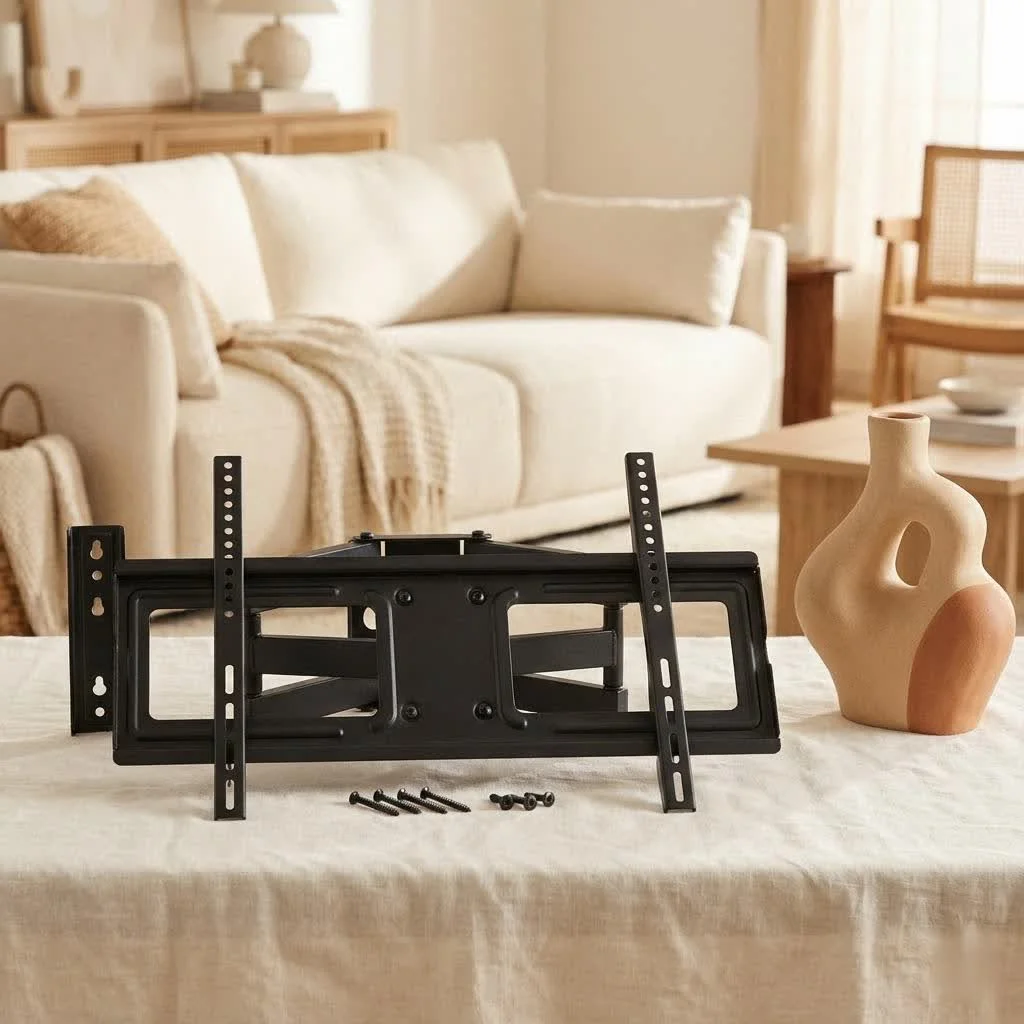
A fixed TV mount is a wall bracket designed to hold your television flat and securely against the wall, providing a stable, unobtrusive platform that makes your TV appear almost like a framed piece of art. These mounts are ideal for achieving a sleek, minimalist aesthetic and reclaiming valuable floor space, especially in rooms where the primary viewing position is directly in front of the screen. They offer exceptional stability and are generally the most budget-friendly and straightforward to install among all TV mounting types.
What is a Fixed TV Mount?
Simply put, a fixed TV mount, often referred to as a low-profile or flush mount, is a type of wall bracket designed to hold your television flat and securely against the wall. Unlike its more adjustable cousins, it doesn’t offer any tilting, swiveling, or extending capabilities. Its primary purpose is to provide a stable, unobtrusive platform that makes your TV appear almost like a framed piece of art, seamlessly integrated into your home decor. For complete tv mounts library on this site.
Why Choose a Fixed TV Mount? The Unbeatable Benefits
So, why would you opt for a mount that doesn’t move? The reasons are compelling, especially if your viewing habits and room layout align with its strengths.
Sleek, Low-Profile Design
One of the most significant advantages of a fixed TV mount is its unparalleled ability to keep your television incredibly close to the wall. This creates a remarkably sleek, minimalist look that makes your TV blend seamlessly rather than dominate the space. If you appreciate clean lines and an uncluttered aesthetic, a fixed mount is your best friend.
Space-Saving Champion
By mounting your TV directly on the wall, you instantly reclaim valuable floor space that would otherwise be occupied by a traditional TV stand or entertainment unit. This is particularly beneficial for smaller rooms, apartments, or any area where maximizing every square inch is crucial. Imagine the possibilities – a new plant, a cozy reading nook, or simply more room to breathe.
Sturdy and Secure Installation
With fewer moving parts compared to tilting or full-motion mounts, a fixed TV mount offers exceptional stability and security. Once properly installed, your television will be held firmly in place, giving you peace of mind that your expensive investment is safe and sound. Its robust nature is ideal for households with pets or young children, minimizing accidental bumps or shifts.
Cost-Effective Solution
Generally, fixed TV mounts are the most budget-friendly option among all TV mounting types. Their simpler design translates to lower manufacturing costs, making them an excellent choice if you’re looking for a secure and stylish wall-mounting solution without breaking the bank.
Simpler Installation Process
|
Our Picks for the Best TV Mount in 2026
As an Amazon Associate I earn from qualifying purchases.
|
||
| Num | Product | Action |
|---|---|---|
| 1 | Perlegear Full Motion TV Wall Mount for Most 42–86 inch Flat Curved TVs up to 132 lbs, 12″/16″ Wood Studs, Bracket with Articulating Arms, Swivel, Tool-Free Tilt, Max VESA 600x400mm PGLF12 |

|
| 2 | USX Mount Full Motion TV Wall Mount for Most 42-90 inch Flat Screen/LED/4K, TV Mount Bracket Dual Swivel Articulating Tilt 6 Arms, Max 16\" Wood Studs, VESA 600x400mm, Holds up to 132lbs |
|
| 3 | Pipishell Full Motion TV Wall Mount for Echo Show 21/15 and 13-43 Inch Flat Curved Screen TVs & Monitors, Max VESA 200x200mm up to 44lbs, TV Mount Wall Bracket with Rotation Swivel Tilt Extension |
|
| 4 | USX MOUNT Full Motion TV Wall Mount for Most 32-70 inch TVs up to 99 lbs, Wall Mount Bracket with Dual Articulating Arms, Swivel, Tilt, Max VESA 400x400mm, TV Mount Fits 12”/16” Wood Studs |
|
| 5 | Mounting Dream TV Wall Mount for 32-65 Inch Television,Mount with Swivel and Tilt, Full Motion Bracket with Articulating Dual Arms, Fits 16inch Studs, Max VESA 400X400 mm, 99lbs, MD2380 |
|
| 6 | MOUNTUP Full Motion TV Wall Mount for Most 26-60 Inch TVs, Max VESA 400x400mm Wall Mount TV Bracket with Swivel Tilting Extension Level Adjustment for LED LCD Flat Curved TVs Up to 77 LBS, MU0018 |
|
| 7 | Amazon Basics Full Motion Articulating TV Wall Mount, with Swivel and Tilt, for 26\" to 55\" TVs and Flat Panels up to 80 Lbs, VESA Compatible, Black |
|
| 8 | monTEK Motorized Ceiling TV Mount for 43-86 Inch TVs, Heavy-Duty 121lbs (4X Load Tested), Off-Center VESA Compatible, Electric Flip Down with Remote/App/Voice Control, Fits Flat & Pitched Roof |
|
| 9 | Mounting Dream TV Wall Mount for Most 37-75 Inch TVs, Universal Tilt TV Mount Fit 16\", 18\", 24\" Stud with Loading Capacity 132lbs, Max Vesa 600 x 400mm, Low Profile Flat Wall Mount TV Bracket |
|
| 10 | Magnetic Monitor Wall Mount for Steel Surfaces, Fits 13 to 34 Inch Screens, Holds up to 22 lbs, VESA 75/100 Compatible Wall Mount for Computer and TV Monitor, No-Drill Installation with All Screws |
|
While all TV mounting requires careful attention to detail, fixed mounts typically have a more straightforward installation process. With fewer components and no complex articulation mechanisms, DIY enthusiasts often find fixed mounts easier to install, saving you time and potential installation fees.
Ideal for Dedicated Viewing Areas
If your room layout allows you to comfortably view your TV from one primary seating position, a fixed TV mount is an ideal choice. It’s perfect for living rooms, bedrooms, or media rooms where the main viewing spot is directly in front of the screen, and you don’t require frequent adjustments.
Understanding the Limitations: When a Fixed TV Mount Might Not Be Right
While fixed mounts offer many advantages, it’s crucial to acknowledge their limitations to ensure they align with your specific needs.
No Adjustability
The defining characteristic of a fixed mount is its lack of movement. This means you cannot tilt the screen up or down, swivel it side-to-side, or extend it away from the wall. Once installed, your TV’s position is permanent.
Glare Concerns
Because there’s no way to adjust the screen angle, fixed mounts can be susceptible to glare from windows or overhead lighting. If your room has significant light sources that could cause reflections, you might find this lack of adjustability frustrating.
Tricky Cable Access
The low-profile design, while aesthetically pleasing, means there’s very little space between the back of your TV and the wall. This can make accessing ports and connecting or disconnecting cables a bit challenging. Planning your cable management before installation is key.
Permanent Positioning
Deciding on the perfect spot is paramount with a fixed TV mount. If your viewing habits change or you decide to rearrange your furniture, repositioning the TV would require uninstalling and reinstalling the mount, which can be a hassle.
Fixed TV Mount vs. Other Popular Types
To truly appreciate the fixed TV mount, it’s helpful to see how it stacks up against other common options:
- Tilting TV Mounts: These mounts allow for vertical angle adjustments (usually 5-15 degrees up or down). They are great for reducing glare or when mounting a TV above eye level, like over a fireplace. They offer a bit more flexibility than fixed mounts but still keep the TV relatively close to the wall.
- Full-Motion (Articulating) TV Mounts: These are the most versatile, allowing you to extend the TV away from the wall, swivel it left or right, and tilt it vertically. Full-motion mounts are perfect for open-concept spaces, rooms with multiple viewing angles, or if you need easy access to the back of your TV for cable management. However, they are typically more expensive and involve a more complex installation.
A fixed TV mount remains the champion for simplicity, security, and a truly flush aesthetic when maximum adjustability isn’t a priority.
How to Choose the Perfect Fixed TV Mount for Your Television
Selecting the right fixed mount isn’t just about aesthetics; it’s about ensuring safety and compatibility. Here’s how to get it right:
TV Size and Weight: The Golden Rule of Safety
Always match your TV’s size and weight to the mount’s specifications. Every mount has a maximum weight capacity and a recommended screen size range. Exceeding these limits is a safety hazard. Check your TV’s manual for its exact weight.
VESA Compatibility: Your TV’s Fingerprint
VESA (Video Electronics Standards Association) is a universal standard for TV mounting holes. On the back of your TV, you’ll find four threaded holes in a square or rectangular pattern. Measure the horizontal and vertical distance between these holes in millimeters (e.g., 400x400mm, 200x100mm). Your chosen fixed TV mount must be compatible with your TV’s VESA pattern.
Room Layout and Viewing Habits
Consider where you’ll be sitting when watching TV. Is there a single, consistent viewing spot? If so, a fixed mount is ideal. If your seating arrangements are dynamic or you watch from different areas, you might reconsider a tilting or full-motion option.
Wall Type
The material of your wall dictates the type of hardware and installation method required.
- Wood Studs: The most common and secure option, requiring lag bolts to fasten directly into the studs.
- Concrete/Brick: Requires a hammer drill and masonry anchors.
- Drywall (without studs): Generally not recommended for heavy TVs. If unavoidable, use heavy-duty toggle bolts, but always prioritize mounting into studs for maximum security.
DIY Installation: Step-by-Step Guide for Your Fixed TV Mount
Ready to get your TV up on the wall? Here’s a comprehensive guide to installing your fixed TV mount safely and effectively.
1. Gather Your Tools
Before you begin, ensure you have these essentials:
- Stud finder
- Power drill with various bits
- Level
- Measuring tape
- Pencil
- Phillips head screwdriver
- Socket wrench (often included with the mount)
- Safety glasses
- Helper (highly recommended for lifting the TV)
2. Locate Wall Studs
This is arguably the most critical step for a secure installation. Use your stud finder to locate at least two vertical wood studs behind your drywall. Mark their centers clearly with your pencil. If installing on concrete/brick, identify your desired location and ensure no hidden pipes or wires.
3. Determine Optimal TV Height
The general rule of thumb for comfortable viewing is to position the center of your screen at eye level when you are seated. Typically, this means the bottom of the TV will be about 24-30 inches above the floor, depending on your sofa height. Mark this desired center point on the wall.
4. Mark Pilot Holes
Hold the wall bracket of your fixed TV mount against the wall, aligning it with your stud marks and your desired height. Use a level to ensure it’s perfectly straight, then mark the drill points for your pilot holes. Double-check everything before drilling!
5. Attach the Mount Brackets to the Wall
Using your drill, create pilot holes at your marked spots. Ensure the drill bit size matches the manufacturer’s recommendations for your lag bolts. Securely fasten the wall bracket to the studs using the provided lag bolts and a socket wrench. Tighten them firmly, but don’t overtighten, which can strip the wood.
6. Attach TV Brackets to the TV
Carefully lay your TV screen down on a soft, clean surface. Locate the VESA mounting holes on the back. Attach the TV brackets (the smaller parts that go on the TV itself) to the back of your television using the screws provided with the mount. Ensure they are tightened securely.
7. Mount the TV onto the Wall Bracket
With a helper, carefully lift the TV and hook the TV brackets onto the wall bracket. Most fixed mounts have a locking mechanism (often clips or screws at the bottom) to secure the TV in place. Engage these mechanisms immediately to prevent accidental dislodging.
8. Cable Management Tips
Due to the minimal space behind a fixed mount, cable management requires a bit of foresight.
- Right-Angle Adapters: Use right-angle HDMI or power adapters to prevent cables from bending sharply or pushing the TV away from the wall.
- In-Wall Cable Kits: For the cleanest look, consider an in-wall cable management kit. This involves cutting small holes in your drywall (with a wall-fish tool) to route cables inside the wall. Always check for electrical wiring before cutting.
- Cable Ties/Sleeves: Bundle and secure any visible cables along the back of the TV or to the mount itself using cable ties or sleeves to keep them tidy.
Troubleshooting Common Fixed TV Mount Issues
Even with the best preparation, you might encounter a snag or two.
- Uneven TV: If your TV appears crooked, use a level to identify which side is lower. You may need to slightly loosen and readjust the wall bracket, or some mounts have small adjustment screws for leveling.
- Difficulty Accessing Ports: This is a common complaint with fixed mounts. If you forgot to plug in a device, try using a small mirror and a flashlight, or gently prop the bottom of the TV away from the wall for temporary access. Right-angle adapters are truly your friend here.
- Glare: Unfortunately, with a fixed mount, the primary solution for glare is adjusting ambient lighting or using blinds/curtains. If glare becomes a persistent problem, a tilting mount might be a better long-term solution for that particular room.
Expert Insights from Dikfu.com
“A fixed TV mount is more than just hardware; it’s a commitment to minimalist design and a focal point for your room,” says Johnathan Vance, Senior Mount Engineer at Dikfu.com. “When properly selected and installed, it offers an unparalleled clean aesthetic that truly elevates your home entertainment experience. It’s all about creating that perfect, unadulterated view.”
Frequently Asked Questions (FAQ)
Q: Can I install a fixed TV mount on any wall?
A: You can install a fixed TV mount on most wall types (wood stud, concrete, brick), but the installation method and hardware will vary. Drywall without studs is generally not recommended for heavy TVs, as it may not provide adequate support.
Q: What if my TV ports face directly backward?
A: Backward-facing ports can be challenging with a low-profile fixed mount. We highly recommend using right-angle adapters for HDMI, power, and other cables to prevent damage and allow the TV to sit flush.
Q: How do I know the right height for my fixed TV mount?
A: The ideal height places the center of your TV at eye level when you are comfortably seated. A common recommendation is to have the bottom of the TV around 24-30 inches from the floor, but this can vary based on your specific seating and TV size.
Q: Are fixed TV mounts safe?
A: Yes, when chosen correctly for your TV’s size and weight, and installed properly into secure wall studs or appropriate masonry, fixed TV mounts are extremely safe and stable. Always follow the manufacturer’s instructions.
Q: Can I hide cables with a fixed TV mount?
A: Hiding cables with a fixed TV mount is possible but requires planning. Options include using right-angle adapters, surface-mounted cable raceways that can be painted to match your wall, or for the most discreet look, an in-wall cable management kit.
Conclusion
Choosing a fixed TV mount is a smart decision for anyone looking to create a clean, modern, and space-efficient home entertainment setup. Its sturdy, low-profile design offers a seamless aesthetic that transforms your living space, making your television a subtle yet sophisticated focal point. While it sacrifices adjustability for simplicity and a flush look, understanding its benefits and limitations ensures you make the best choice for your home. By following our expert guidance on selection and installation, you can confidently achieve that polished, wall-mounted TV experience you’ve always desired, turning your viewing area into a true shows modern living.
Frequently Asked Questions
What are the main advantages of a fixed TV mount?
Fixed TV mounts offer several key advantages, including a sleek, low-profile design that keeps the TV close to the wall, significant space-saving benefits by eliminating bulky stands, and a highly sturdy and secure installation. They are also generally more cost-effective and simpler to install compared to adjustable mounts.
Can a fixed TV mount be installed on any type of wall?
A fixed TV mount can be installed on most wall types, including wood studs, concrete, and brick, each requiring specific hardware and installation methods. However, installing heavy TVs on drywall without studs is generally not recommended due to insufficient support and potential safety risks.
How do I determine the correct VESA pattern for my television?
To determine the correct VESA pattern, measure the horizontal and vertical distance between the four threaded mounting holes on the back of your TV in millimeters. For example, a 400x400mm pattern means the holes are 400mm apart horizontally and 400mm vertically. Your chosen fixed TV mount must match this pattern for compatibility.
What is the ideal viewing height for a wall-mounted TV?
The ideal viewing height for a wall-mounted TV is typically when the center of the screen is at eye level while you are comfortably seated. This often translates to the bottom of the TV being approximately 24-30 inches from the floor, depending on your seating height and TV size.
What are the best ways to manage cables with a fixed TV mount?
Effective cable management for a fixed TV mount often involves using right-angle HDMI or power adapters to prevent sharp bends, and for a cleaner look, considering an in-wall cable management kit. Alternatively, surface-mounted cable raceways or simple cable ties can help bundle and secure visible cables.
Install Your Fixed TV Mount Safely and Effectively
Follow these steps to securely install your fixed TV mount and achieve a clean, wall-mounted television setup.
Before starting, collect essential tools like a stud finder, drill, level, and measuring tape. Use the stud finder to locate at least two vertical wood studs behind your drywall and mark their centers clearly with a pencil for secure mounting.
Position the center of your TV at eye level when seated, typically with the bottom of the TV 24-30 inches from the floor. Hold the wall bracket against the wall, align it with stud marks, use a level to ensure it's straight, and mark the pilot drill points.
Drill pilot holes at the marked spots, matching the drill bit size to the lag bolts. Securely fasten the wall bracket to the studs using lag bolts and a socket wrench. Then, lay your TV on a soft surface, locate the VESA holes, and attach the TV brackets to the back of the television with the provided screws.
With a helper, carefully lift the TV and hook the TV brackets onto the wall bracket, engaging any locking mechanisms. For cable management, use right-angle adapters for ports, and consider an in-wall cable kit or cable ties to keep wires tidy and out of sight.
Get our weekly buyer guide
Practical specs, not advice. Unsubscribe anytime.
I picked up a fixed mount because it was described as budget-friendly, and it certainly was. For the price, it’s a solid choice for a guest room where the viewing position is always direct. However, I do miss the ability to tilt the screen a little to reduce glare from the window. If you need any adjustability, even minor, this isn’t the mount for you.
I’m really happy with my new low-profile mount. It definitely gives that sleek, minimalist aesthetic I was going for in my bedroom. The stability is excellent, and I don’t have to worry about the TV at all. My only minor complaint is that getting to the cables behind the TV is a bit of a pain once it’s up, but that’s the trade-off for how flush it sits.
I finally got around to installing a fixed TV mount in my living room, and it’s made such a difference! The post mentioned how it reclaims floor space, and that’s exactly what I needed. My 65-inch TV now looks like a piece of art on the wall, and the room feels so much bigger. Installation was surprisingly straightforward, even for a DIY novice like me.
This type of mount was perfect for our media room. We have a dedicated viewing area, so we don’t need any swiveling or extending. The TV is held securely against the wall, just as described, and it really does look like a framed picture. It was also one of the easiest home theater accessories I’ve ever installed.