Wall mounting your Samsung TV enhances your home entertainment by saving space, optimizing viewing angles, and improving safety. A properly chosen and installed Samsung TV wall mount creates a sleek, immersive focal point, transforming your living space and viewing experience. With over 15 years of experience in TV mount installations, I’ve observed that a secure mount is a major upgrade for modern homes.
Why Wall Mounting Your Samsung TV is a major upgrade
When you decide to wall mount your Samsung TV, you’re not just attaching it to a wall; you’re unlocking a host of benefits that enhance both your home’s aesthetics and functionality. For shop curated tv mounts on this site.
Space-Saving and Aesthetics
Modern living often calls for clever space solutions. Bulky TV stands can consume valuable floor space and disrupt a room’s clean lines. A wall-mounted Samsung TV, with its often-slim design, instantly creates a minimalist, clutter-free environment. It makes your room feel larger and more open, offering endless possibilities for furniture arrangement and interior design.
Optimal Viewing Angles
Wall mounting allows for precise positioning, ensuring your Samsung TV is at the optimal height and angle for comfortable, immersive viewing from any spot in the room. This eliminates neck strain and reduces annoying glare from windows or overhead lighting, enhancing movie nights or gaming sessions.
Enhanced Safety
For homes with energetic kids or curious pets, safety is paramount. A securely mounted Samsung TV eliminates the risk of accidental tipping or falling, providing peace of mind. It’s a stable, secure setup that keeps your valuable TV and loved ones safe from harm.
Decoding Samsung TV Wall Mount Types
Choosing the right Samsung TV wall mount is like picking the perfect frame for a masterpiece – it has to fit the art and the wall. There are several primary types, each offering distinct advantages.
Fixed Mounts: The Sleek Minimalist
Fixed wall mounts are the simplest and most affordable option. They hold your Samsung TV flush against the wall, creating a clean, picture-frame-like aesthetic. These are ideal if you have a dedicated viewing area directly in front of the screen and don’t anticipate needing to adjust the angle. Their low profile is unbeatable for a truly integrated look.
Tilting Mounts: Battling Glare with Ease
Tilting mounts offer more flexibility, allowing you to tilt your Samsung TV vertically, usually up or down by 5 to 15 degrees. This feature is a lifesaver for reducing glare from windows or overhead lighting, especially if your TV is mounted a bit higher, like above a fireplace. They maintain a relatively close profile to the wall while providing crucial glare control.
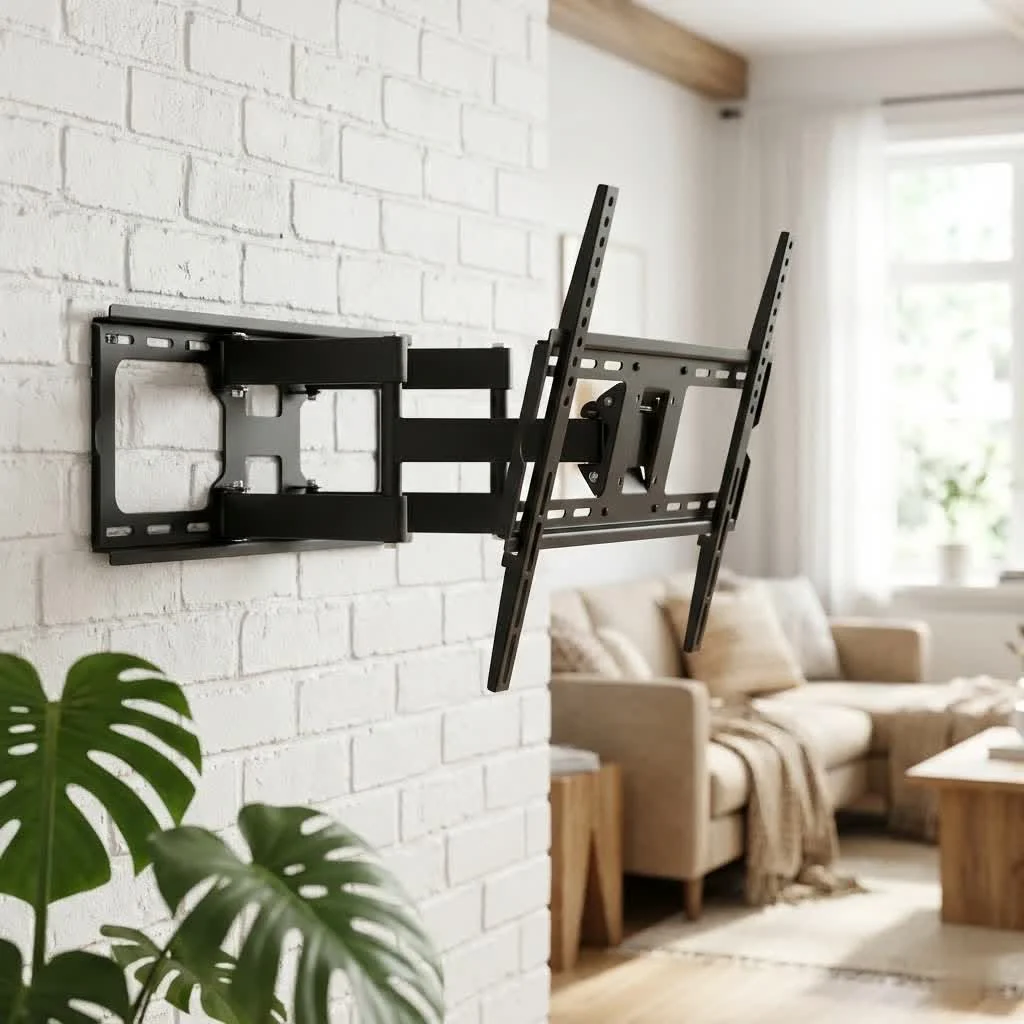
Full-Motion (Articulating) Mounts: Unrivaled Flexibility
|
Our Picks for the Best TV Mount in 2026
As an Amazon Associate I earn from qualifying purchases.
|
||
| Num | Product | Action |
|---|---|---|
| 1 | monTEK Motorized Ceiling TV Mount for 43-86 Inch TVs, Heavy-Duty 121lbs (4X Load Tested), Off-Center VESA Compatible, Electric Flip Down with Remote/App/Voice Control, Fits Flat & Pitched Roof |

|
| 2 | USX MOUNT Full Motion TV Wall Mount for Most 32-70 inch TVs up to 99 lbs, Wall Mount Bracket with Dual Articulating Arms, Swivel, Tilt, Max VESA 400x400mm, TV Mount Fits 12”/16” Wood Studs |
|
| 3 | USX Mount Full Motion TV Wall Mount for Most 42-90 inch Flat Screen/LED/4K, TV Mount Bracket Dual Swivel Articulating Tilt 6 Arms, Max 16\" Wood Studs, VESA 600x400mm, Holds up to 132lbs |
|
| 4 | Mounting Dream TV Wall Mount for 32-65 Inch Television,Mount with Swivel and Tilt, Full Motion Bracket with Articulating Dual Arms, Fits 16inch Studs, Max VESA 400X400 mm, 99lbs, MD2380 |
|
| 5 | Mounting Dream TV Wall Mount for Most 37-75 Inch TVs, Universal Tilt TV Mount Fit 16\", 18\", 24\" Stud with Loading Capacity 132lbs, Max Vesa 600 x 400mm, Low Profile Flat Wall Mount TV Bracket |
|
| 6 | Amazon Basics Full Motion Articulating TV Wall Mount, with Swivel and Tilt, for 26\" to 55\" TVs and Flat Panels up to 80 Lbs, VESA Compatible, Black |
|
| 7 | MOUNTUP Full Motion TV Wall Mount for Most 26-60 Inch TVs, Max VESA 400x400mm Wall Mount TV Bracket with Swivel Tilting Extension Level Adjustment for LED LCD Flat Curved TVs Up to 77 LBS, MU0018 |
|
| 8 | Pipishell Full Motion TV Wall Mount for Echo Show 21/15 and 13-43 Inch Flat Curved Screen TVs & Monitors, Max VESA 200x200mm up to 44lbs, TV Mount Wall Bracket with Rotation Swivel Tilt Extension |
|
| 9 | Perlegear Full Motion TV Wall Mount for Most 42–86 inch Flat Curved TVs up to 132 lbs, 12″/16″ Wood Studs, Bracket with Articulating Arms, Swivel, Tool-Free Tilt, Max VESA 600x400mm PGLF12 |
|
| 10 | Magnetic Monitor Wall Mount for Steel Surfaces, Fits 13 to 34 Inch Screens, Holds up to 22 lbs, VESA 75/100 Compatible Wall Mount for Computer and TV Monitor, No-Drill Installation with All Screws |
|
For the ultimate in viewing versatility, full-motion or articulating mounts are your go-to. These mounts come with an arm that allows you to extend, swivel, and tilt your Samsung TV in almost any direction. They are perfect for open-concept living spaces, kitchens, or rooms with multiple seating areas, giving you the freedom to adjust the screen for perfect viewing from anywhere. While they protrude more from the wall, the flexibility they offer is unmatched.
Samsung’s Signature Mounts: No Gap and Slim Fit Explained
Samsung also offers specialized mounts designed to complement their innovative TV lines.
- No Gap Wall Mounts: Exclusively for certain QLED and Frame TVs, these mounts allow your Samsung TV to sit incredibly close to the wall, virtually eliminating any gap. They still provide enough room for ventilation and even allow for minor leveling adjustments after the TV is hung, simplifying the installation process.
- Slim Fit Wall Mounts: Similar to No Gap, these mounts also emphasize a minimalist profile, positioning your TV very close to the wall for a sleek, tidy setup. These mounts are perfect for achieving that integrated, elegant look with compatible Samsung models.
The Dikfu Checklist: Choosing the Perfect Samsung TV Wall Mount
Selecting the ideal Samsung TV wall mount isn’t just about aesthetics; it’s about safety and compatibility. Here’s a checklist to guide you:
VESA Compatibility: Your TV’s Mounting Blueprint
The Video Electronics Standards Association (VESA) standard is critical. It defines the distance between the four mounting holes on the back of your TV in millimeters (horizontal x vertical). All Samsung TVs are VESA compliant, meaning they’ll work with any VESA-compliant mount. You’ll find this pattern in your Samsung TV’s user manual or by measuring the holes yourself. Common VESA sizes range from 75x75mm for smaller TVs to 600x400mm for larger ones. Always match your TV’s VESA pattern to the mount’s specifications.
Weight and Size: Ensuring a Secure Fit
Your chosen mount must be rated to support the weight of your Samsung TV. I always recommend adding a 10% safety margin to your TV’s actual weight. Don’t just look at the screen size compatibility; the weight capacity is paramount. Overloading a mount is a recipe for disaster.
Wall Type Matters: Studs, Brick, and Drywall
The type of wall you’re mounting to is crucial for structural integrity.
- Wood or Metal Studs: These are the most secure anchoring points. Use a stud finder to locate them and ensure your mount’s holes align.
- Brick or Concrete: These require specialized masonry anchors and a hammer drill.
- Drywall: While some lighter TVs can be mounted directly into drywall using heavy-duty toggle bolts, it’s generally not recommended for heavier Samsung TVs without finding at least one stud. The risk of the TV crashing down is significant. If you must use drywall anchors, verify their load capacity for each bolt and ensure your wall can handle the total weight.
Your Viewing Habits: Matching Mount to Lifestyle
Consider how you watch TV. Do you always sit in the same spot? A fixed mount might be fine. Do you battle glare or have a higher mounting position? A tilting mount offers relief. Do you move around, entertaining or cooking, and need to adjust the view from various angles? A full-motion Samsung TV wall mount provides the ultimate flexibility.
Cable Management
Nothing ruins the sleek look of a wall-mounted TV faster than a spaghetti tangle of cables. Look for mounts with built-in cable management channels, or plan to conceal cables within the wall (which often requires professional help) or use discreet cable covers. Samsung’s One Connect Box, featured on some models, significantly simplifies this by routing all connections through a single, thin cable.
Step-by-Step Samsung TV Wall Mount Installation: A Pro’s Approach
Ready to get your Samsung TV up on the wall? Here’s how to tackle the installation like a pro:
Tools You’ll Need
Before you begin, gather your toolkit:
- Stud finder
- Power drill with various bits
- Level (a laser level is fantastic for precision)
- Tape measure
- Pencil
- Safety glasses
- Socket wrench or adjustable wrench
- Screwdriver set
- Painter’s tape (optional, for marking)
Preparation is Key: Location and Safety
First, read both your Samsung TV’s manual and your chosen mount’s instructions thoroughly. Next, pick the ideal spot. The center of your TV screen should generally be at eye level when you’re seated (around 42-48 inches from the floor for most living room setups). Avoid areas with direct sunlight, excessive heat sources like fireplaces, or high humidity. Always enlist a helper – lifting and positioning a TV, especially a larger Samsung model, is definitely a two-person job.
Securing the TV Brackets
Lay your Samsung TV face down on a clean, soft surface (like a blanket on the floor). Attach the vertical mounting brackets to the back of your TV using the screws and spacers provided with your mount. Ensure the screws are the correct length – too long, and they can damage the TV’s internal components; too short, and they won’t secure properly.
Mounting the Wall Plate: Precision is Paramount
Now for the wall plate. Use your stud finder to locate and mark the center of two adjacent wall studs. If using drywall anchors, follow their specific instructions, but as I always say, “When in doubt, find a stud!” Hold the wall plate against your marked stud locations, use your level to ensure it’s perfectly horizontal, and mark your drill points. Drill pilot holes, then secure the wall plate firmly to the wall using the lag bolts. Ensure every bolt is tightened securely; loose connections are a primary cause of future problems.
The Grand Reveal: Hanging Your Samsung TV
With the wall plate securely fastened, carefully lift your Samsung TV (with your helper!) and hook its attached brackets onto the wall plate. Many mounts have safety clips or screws that lock the TV in place – engage these immediately.
Fine-Tuning and Adjustments
Most modern mounts, including many Samsung brand mounts, offer some post-installation adjustment. Take a step back and use your level one last time to confirm your TV is perfectly straight. Adjust any tilt or swivel mechanisms to achieve your desired viewing angle. For Samsung’s No Gap mounts, you often have a bit of wiggle room to level the screen even after it’s on the wall.
Common Pitfalls and How to Avoid Them
Even with the best intentions, mistakes can happen. Here are some common pitfalls and how to steer clear:
The Wrong Mount, The Wrong Wall
“From my 15 years in the field, the biggest differentiator between a good and a great TV mounting experience isn’t just the TV, but the thoughtful choice and precise installation of its mount. Especially with Samsung’s innovative designs, getting it right means blending technology seamlessly into your living space,” notes Marcus Chen, Senior Mounting Specialist at Dikfu.com. Using a mount that doesn’t match your Samsung TV’s VESA pattern, weight, or chosen wall type is a critical error. Always double-check compatibility and choose the right anchors for your specific wall material. Never mount a heavy TV directly into drywall without studs.
Eye-Level Perfection: Avoiding Neck Strain
Mounting your TV too high is a common rookie mistake that leads to uncomfortable neck strain. Aim for the center of the screen to be at eye level when you’re seated in your primary viewing spot. For most living rooms, this is between 42-48 inches from the floor. If you must mount it higher, a tilting mount can help direct the screen downwards for a more comfortable view.
Cable Chaos No More
Forgetting about cable management until after the TV is mounted can lead to an unsightly mess. Plan ahead! Consider installing a power outlet directly behind the TV or routing cables through the wall for a seamless look. If in-wall routing isn’t an option, cable covers can discreetly hide wires. Samsung’s One Connect Box simplifies this significantly for compatible QLED and Frame models.
Level Up: Straightening Your View
A slightly crooked TV is an undeniable eyesore that will bug you every single time you look at it. Always use a reliable level (or a laser level for pinpoint accuracy) multiple times during installation – when marking drill holes, attaching the wall plate, and after hanging the TV. A few extra seconds of care here save you endless frustration later.
The Fireplace Fiasco: Heat and Your TV
While aesthetically tempting, mounting your Samsung TV above a fireplace comes with risks. The heat generated by a fireplace can severely damage your TV’s electronics and shorten its lifespan. If this is your only option, ensure there’s a robust mantel that protrudes enough to block heat, and adequate ventilation. Ideally, avoid mounting over a direct heat source altogether.
FAQ: Your Samsung TV Wall Mount Questions Answered
Q: Do all Samsung TVs use the same wall mount?
A: No, while all Samsung TVs are VESA compliant, they don’t all use the exact same mount. The VESA pattern (mounting hole dimensions) varies by TV size and model, as does the TV’s weight. Always match the mount’s VESA pattern and weight capacity to your specific Samsung TV.
Q: How do I find my Samsung TV’s VESA pattern?
A: You can find your Samsung TV’s VESA pattern in its user manual. Alternatively, measure the horizontal and vertical distance between the four screw holes on the back of your TV (in millimeters). Common patterns include 100x100mm, 200x200mm, and 400x400mm.
Q: Can I install a Samsung TV wall mount by myself?
A: While it’s tempting for a DIY project, for safety, I strongly recommend having at least two people for installation, especially for lifting and hanging the TV. This minimizes the risk of dropping the TV or improper alignment.
Q: What’s the ideal height for a wall-mounted Samsung TV?
A: The ideal height is generally eye level when you are seated in your primary viewing position. For most living rooms, this means the center of the TV screen should be approximately 42-48 inches from the floor. Adjust based on your specific furniture and preferences.
Q: Is it safe to mount a Samsung TV on drywall?
A: Mounting directly into drywall without hitting studs is generally not recommended for heavier Samsung TVs. Drywall isn’t strong enough to support significant weight long-term. Always try to secure the mount to at least two wooden or metal wall studs. If studs aren’t an option, use heavy-duty toggle bolts, but exercise extreme caution and verify the load capacity.
Q: How do I hide cables for my wall-mounted Samsung TV?
A: There are several ways to hide cables: you can route them through the wall (often requiring professional help), use paintable cable covers that blend with your wall, or strategically place furniture or decorative items. Some Samsung TVs, particularly QLED and Frame models, feature a One Connect Box that streamlines all connections into a single, thin cable, making concealment much easier.
Conclusion: Enjoy Your Perfectly Mounted Samsung TV
Mounting your Samsung TV is a rewarding project that significantly upgrades your home entertainment. By understanding the different mount types, carefully considering compatibility, and following safe installation practices, you’ll achieve that sleek, professional look you desire. Don’t be afraid to take your time, double-check your measurements, and always prioritize safety. Once it’s up there, lean back, relax, and enjoy your beautifully integrated Samsung TV wall mount – it truly makes all the difference!
Frequently Asked Questions
Do all Samsung TVs use the same wall mount?
No, while all Samsung TVs are VESA compliant, they don't all use the exact same mount. The VESA pattern (mounting hole dimensions) varies by TV size and model, as does the TV's weight. Always match the mount's VESA pattern and weight capacity to your specific Samsung TV.
How do I find my Samsung TV's VESA pattern?
You can find your Samsung TV's VESA pattern in its user manual. Alternatively, measure the horizontal and vertical distance between the four screw holes on the back of your TV in millimeters. Common patterns include 100x100mm, 200x200mm, and 400x400mm.
Can I install a Samsung TV wall mount by myself?
For safety, I strongly recommend having at least two people for installation, especially for lifting and hanging the TV. This minimizes the risk of dropping the TV or improper alignment, which can damage the TV or cause injury.
What's the ideal height for a wall-mounted Samsung TV?
The ideal height is generally eye level when you are seated in your primary viewing position. For most living rooms, this means the center of the TV screen should be approximately 42-48 inches from the floor. Adjust based on your specific furniture and preferences for optimal comfort.
Is it safe to mount a Samsung TV on drywall?
Mounting directly into drywall without hitting studs is generally not recommended for heavier Samsung TVs. Drywall isn't strong enough to support significant weight long-term. Always try to secure the mount to at least two wooden or metal wall studs. If studs aren't an option, use heavy-duty toggle bolts, but exercise extreme caution and verify the load capacity for each bolt.
How do I hide cables for my wall-mounted Samsung TV?
There are several ways to hide cables: you can route them through the wall (often requiring professional help), use paintable cable covers that blend with your wall, or strategically place furniture or decorative items. Some Samsung TVs, particularly QLED and Frame models, feature a One Connect Box that streamlines all connections into a single, thin cable, making concealment much easier.
Install Your Samsung TV Wall Mount
Follow these steps to safely and securely install your Samsung TV wall mount, ensuring optimal viewing and a clean aesthetic.
Collect all necessary tools including a stud finder, drill, level, and tape measure. Read both your TV and mount manuals. Choose an ideal spot, typically with the TV center at eye level (42-48 inches from the floor), avoiding direct sunlight or heat sources. Always have a helper for safety.
Lay your Samsung TV face down on a soft, clean surface. Attach the vertical mounting brackets to the back of the TV using the provided screws and spacers. Ensure screws are the correct length to avoid damage or insecure fitting.
Use a stud finder to locate and mark the center of two adjacent wall studs. Hold the wall plate against these marks, use a level to ensure it's perfectly horizontal, and mark your drill points. Drill pilot holes, then securely fasten the wall plate to the wall using lag bolts, ensuring all connections are tight.
With your helper, carefully lift the Samsung TV and hook its attached brackets onto the wall plate. Engage any safety clips or screws to lock the TV in place immediately. Step back and use your level to confirm the TV is perfectly straight, then adjust any tilt or swivel mechanisms for your desired viewing angle.
Get our weekly buyer guide
Practical specs, not advice. Unsubscribe anytime.
As someone with 15+ years in home theater setups, I can attest that a good wall mount is crucial. This post really nails why wall mounting your Samsung TV is a game-changer. I always recommend getting a mount that can handle more weight than your TV to be safe, and the advice here aligns perfectly with that. My setup looks so much cleaner now.
This guide was super helpful for picking out a mount for my new Samsung QLED. I was worried about getting the right VESA pattern, but the tips here made it clear. The only reason it’s not 5 stars is that the included level in my mount kit was a bit off, so I had to use my own. Still, the secure mount feels really solid.
I appreciate the focus on safety when choosing a Samsung TV wall mount. I went with a fixed mount for my bedroom TV, and while it’s sturdy, I wish I’d considered a tilting one more. It’s a bit high for comfortable viewing from bed, and I didn’t realize how much I’d miss the slight angle adjustment. My bad for not reading closer!
I finally got around to wall mounting my 65-inch Samsung, and it’s made such a difference! The space-saving aspect is huge for my smaller living room. I used one of the full-motion mounts mentioned, and it was surprisingly easy to install, even for a DIY novice like me. Definitely a game-changer for our viewing experience.