Thinking about mounting your TV to the wall for that sleek, cinematic look? You’re in good company! Wall-mounting a TV not only frees up valuable space but also elevates your viewing experience. But before you grab a drill, there’s one critical standard you absolutely need to understand: the Vesa Tv Mount standard. As someone with over 15 years in the field, I can tell you that getting this right is the cornerstone of a safe and successful installation.
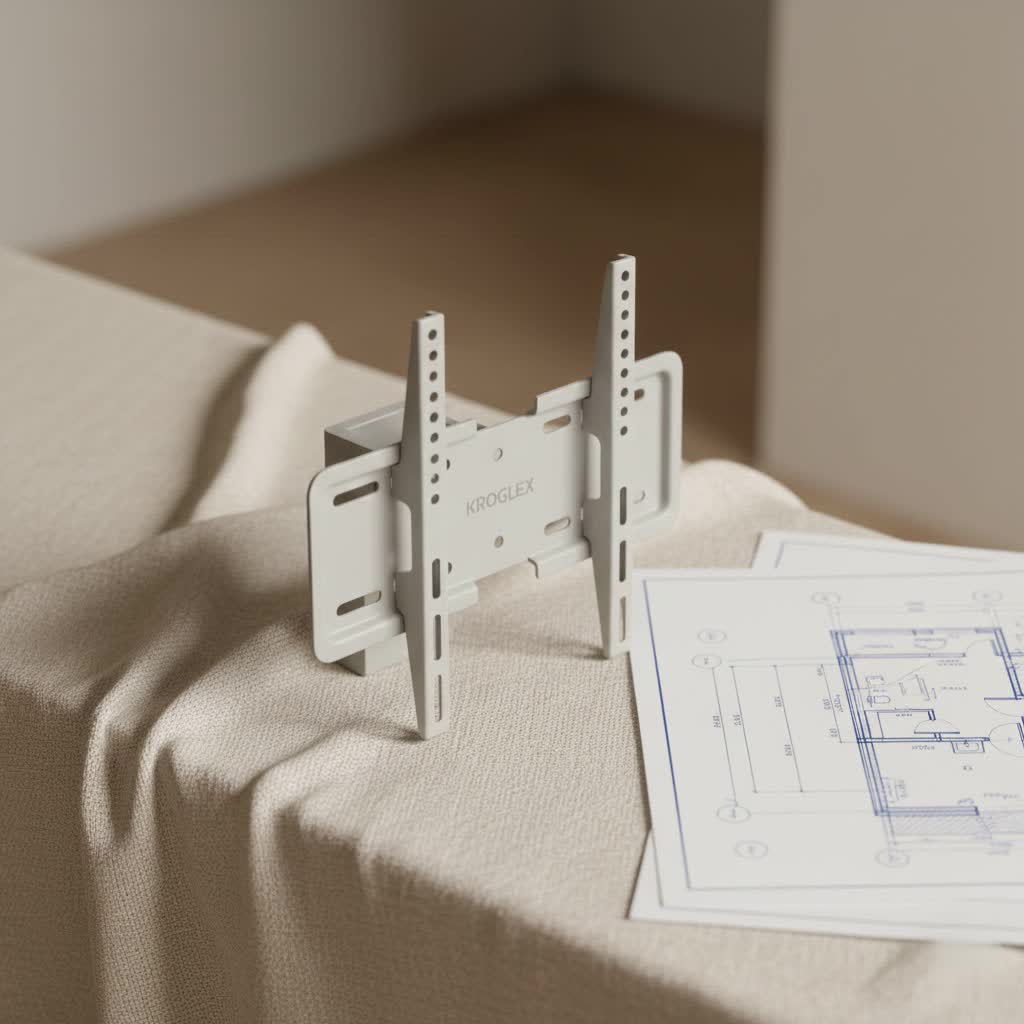
The Video Electronics Standards Association, or VESA, established universal guidelines for the screw-hole patterns on the back of your television. This standardization means that most TVs and TV mounts, regardless of brand, are designed to work together seamlessly, provided you match the VESA pattern. It’s like a universal language for your TV and its mount, ensuring compatibility and security. Without understanding your TV’s VESA size, you might end up with a mount that simply doesn’t fit – a frustration we definitely want to avoid!
What Exactly is the VESA Standard?
At its core, the VESA standard defines the precise distance in millimeters between the four mounting holes you’ll find on the back of nearly every flat-screen TV. These measurements are always expressed as horizontal distance x vertical distance. For example, a VESA 200×200 pattern means the mounting holes are 200 millimeters apart horizontally and 200 millimeters apart vertically, forming a perfect square. A VESA 400×200 pattern, on the other hand, indicates a rectangular setup: 400mm horizontally and 200mm vertically.
Why is VESA So Important?
|
Our Picks for the Best TV Mount in 2026
As an Amazon Associate I earn from qualifying purchases.
|
||
| Num | Product | Action |
|---|---|---|
| 1 | monTEK Motorized Ceiling TV Mount for 43-86 Inch TVs, Heavy-Duty 121lbs (4X Load Tested), Off-Center VESA Compatible, Electric Flip Down with Remote/App/Voice Control, Fits Flat & Pitched Roof |

|
| 2 | Perlegear Full Motion TV Wall Mount for Most 42–86 inch Flat Curved TVs up to 132 lbs, 12″/16″ Wood Studs, Bracket with Articulating Arms, Swivel, Tool-Free Tilt, Max VESA 600x400mm PGLF12 |
|
| 3 | MOUNTUP Full Motion TV Wall Mount for Most 26-60 Inch TVs, Max VESA 400x400mm Wall Mount TV Bracket with Swivel Tilting Extension Level Adjustment for LED LCD Flat Curved TVs Up to 77 LBS, MU0018 |
|
| 4 | USX MOUNT Full Motion TV Wall Mount for Most 32-70 inch TVs up to 99 lbs, Wall Mount Bracket with Dual Articulating Arms, Swivel, Tilt, Max VESA 400x400mm, TV Mount Fits 12”/16” Wood Studs |
|
| 5 | Magnetic Monitor Wall Mount for Steel Surfaces, Fits 13 to 34 Inch Screens, Holds up to 22 lbs, VESA 75/100 Compatible Wall Mount for Computer and TV Monitor, No-Drill Installation with All Screws |
|
| 6 | USX Mount Full Motion TV Wall Mount for Most 42-90 inch Flat Screen/LED/4K, TV Mount Bracket Dual Swivel Articulating Tilt 6 Arms, Max 16\" Wood Studs, VESA 600x400mm, Holds up to 132lbs |
|
| 7 | Pipishell Full Motion TV Wall Mount for Echo Show 21/15 and 13-43 Inch Flat Curved Screen TVs & Monitors, Max VESA 200x200mm up to 44lbs, TV Mount Wall Bracket with Rotation Swivel Tilt Extension |
|
| 8 | Mounting Dream TV Wall Mount for 32-65 Inch Television,Mount with Swivel and Tilt, Full Motion Bracket with Articulating Dual Arms, Fits 16inch Studs, Max VESA 400X400 mm, 99lbs, MD2380 |
|
| 9 | Amazon Basics Full Motion Articulating TV Wall Mount, with Swivel and Tilt, for 26\" to 55\" TVs and Flat Panels up to 80 Lbs, VESA Compatible, Black |
|
| 10 | Mounting Dream TV Wall Mount for Most 37-75 Inch TVs, Universal Tilt TV Mount Fit 16\", 18\", 24\" Stud with Loading Capacity 132lbs, Max Vesa 600 x 400mm, Low Profile Flat Wall Mount TV Bracket |
|
The VESA standard is the unsung hero of TV mounting. It allows manufacturers to create a wide range of TVs and mounts that can interact, giving you, the consumer, a vast selection of compatible options. Imagine the chaos if every TV brand had its own unique mounting pattern – it would be a nightmare trying to find the right mount! Thanks to VESA, we have a clear, reliable system that takes the guesswork out of finding a compatible mount.
“Understanding your TV’s VESA pattern is the first and most crucial step in safe TV mounting,” advises Anya Sharma, a lead engineer at Dikfu.com. “It’s the foundation upon which your entire installation will rest.”
How to Find Your TV’s VESA Size
So, how do you discover this vital VESA number for your TV? It’s usually straightforward:
- Check Your TV Manual: This is often the quickest and most accurate source. Your TV’s user manual will typically list the VESA compatibility in its specifications.
- Visit the Manufacturer’s Website: If the manual is long gone, head to your TV manufacturer’s official website. Search for your specific TV model, and you’ll likely find the VESA information in the product details or specifications section.
- Measure It Yourself: No manual? No problem! Grab a tape measure and carefully measure the distance between the center of the mounting holes on the back of your TV. Measure horizontally first, then vertically. Remember to measure in millimeters for accuracy. For instance, if your horizontal measurement is 300mm and your vertical is 300mm, your VESA size is 300×300.
It’s also worth noting that the VESA standard specifies screw sizes. Smaller VESA patterns (under 200mm) often use M4 screws, 200×200 patterns commonly use M6 screws, and larger screens typically require M8 screws. Your mount kit should include a variety of screws, but it’s good to be aware.
Choosing the Right VESA TV Mount for Your Needs
Once you know your VESA size, you’re ready to pick out the perfect mount. But VESA compatibility isn’t the only factor. You also need to consider your TV’s weight, screen size, and your desired viewing flexibility.
Types of VESA Compatible TV Mounts:
- Fixed Wall Mounts: These mounts hold your TV flat against the wall, offering the slimmest profile. They’re excellent for permanent installations where the viewing angle is consistent, such as directly in front of a sofa.
- Tilting Wall Mounts: Offering a slight vertical tilt, these are great for reducing glare from windows or lights, or if your TV is mounted a bit higher than eye-level. They keep a relatively low profile while providing some adjustability.
- Swiveling Wall Mounts (Articulating/Full-Motion): These are the most versatile. They allow you to tilt, swivel, and extend your TV away from the wall, providing optimal viewing from multiple angles in a room. Perfect for open-concept spaces or if you want to watch TV from the kitchen while cooking.
Beyond VESA: Other Critical Considerations
When selecting your mount, always double-check these vital specs:
- Weight Capacity: Your mount MUST be rated to support the weight of your TV. Never exceed this limit. Your TV manual will list its weight.
- Screen Size Range: While VESA is about the hole pattern, mounts are also designed for certain screen sizes. Ensure your TV falls within the recommended size range for the mount.
- Wall Type: The material of your wall (drywall with studs, concrete, brick, plaster) will dictate the type of anchors and hardware you need. This is a safety-critical decision.
- Cable Connections: Before mounting, check the location of your TV’s ports. Some fixed mounts sit so close to the wall that backward-facing ports can become inaccessible. Consider right-angle adapters if needed.
Step-by-Step Guide to Safely Installing Your VESA TV Mount
Installing a VESA TV mount isn’t rocket science, but it does require careful attention to detail and adherence to safety guidelines. Here’s a general workflow to guide you:
Tools and Materials You’ll Need:
- Power drill
- Stud finder (essential for drywall)
- Level
- Pencil
- Screwdriver set
- Tape measure
- Safety glasses
- The VESA TV mount kit (including all hardware)
- A friend to help (especially for lifting the TV)
The Installation Process:
- Choose Your Ideal Location: Decide where on the wall your TV will look best and provide the most comfortable viewing angle. Consider eye-level when seated.
- Locate Wall Studs (for drywall): Use a stud finder to locate at least two wooden studs. Mark their centers precisely. Mounting into studs is crucial for supporting your TV’s weight. For concrete or brick walls, you’ll need specific masonry anchors.
- Prepare the Wall Plate: Hold the wall plate (the part of the mount that attaches to the wall) against the wall at your desired height and use a level to ensure it’s perfectly straight. Mark the drill holes with your pencil.
- Drill Pilot Holes: Using your power drill, carefully drill pilot holes at the marked spots. The drill bit size will be specified in your mount’s instructions. If mounting into drywall without hitting a stud, you will need heavy-duty toggle bolts or specialized drywall anchors.
- Attach the Wall Plate: Secure the wall plate to the wall using the provided lag bolts or appropriate fasteners for your wall type. Tighten them firmly, but avoid overtightening, which can strip the threads or damage the wall.
- Attach Mounting Brackets to Your TV: With the help of a friend, carefully lay your TV face down on a soft, clean surface (like a blanket on a table). Align the TV brackets (the parts that attach to your TV) with the VESA holes on the back of the TV. Secure them with the screws provided in your mount kit. Ensure these are tightened snugly, but again, do not overtighten.
- Connect Cables (Optional but Recommended): While the TV is still on the table, it’s often easier to plug in all your necessary cables (HDMI, power, optical, etc.) before lifting it onto the wall. This saves you from fumbling behind the TV later.
- Mount the TV to the Wall Plate: This is a two-person job! With your friend, carefully lift the TV, aligning the brackets on the TV with the wall plate. Hook or slide the TV onto the wall plate according to your mount’s design. Listen for any clicks or engage any locking mechanisms to ensure it’s securely in place.
- Check Stability and Make Adjustments: Gently test the mount’s stability. If it’s a tilting or articulating mount, make any desired angle adjustments. Ensure all connections are secure.
Common Installation Pitfalls and How to Avoid Them
Even seasoned DIY enthusiasts can make mistakes. Here are some common issues and how to steer clear:
- Ignoring VESA Compatibility: We’ve stressed this, but it’s the number one error. Always verify your TV’s VESA pattern matches your mount’s capabilities.
- Overlooking Weight Capacity: A mount designed for a 50-pound TV will not safely hold an 80-pound TV. Always check the weight limits.
- Improper Wall Fixings: Relying solely on drywall without hitting studs or using inadequate anchors is a recipe for disaster. Always use robust fasteners appropriate for your wall material. “Never underestimate the importance of secure wall fixings,” says Anya Sharma. “Your TV’s safety, and the safety of your home, depends on it.”
- Overtightening Screws: This can strip screw threads, damage your TV’s casing, or weaken wall anchors. Tighten until snug, then give a quarter-turn more, but don’t force it.
- Failing to Get Help: Lifting a large TV alone is dangerous for both you and the television. Always enlist a friend for the lifting and mounting steps.
Cable Management: The Finishing Touch
Once your VESA TV mount is securely installed, don’t let a tangled mess of cables ruin the aesthetic. Cable management is key to a clean, professional look.
- Cable Ties and Wraps: Simple and effective for bundling cables neatly.
- Cable Sleeves: These fabric or neoprene tubes can encase multiple cables, making them look like a single, streamlined unit.
- Cable Raceways/Concealers: If you can’t run cables inside the wall, surface-mounted raceways can be painted to match your wall, making them virtually disappear.
- In-Wall Cable Management Kits: For the cleanest look, these kits allow you to safely route power and AV cables behind the wall. Always ensure you use specific in-wall rated power cables and follow local electrical codes.
Frequently Asked Questions About VESA TV Mounts
Q1: Is VESA a universal standard?
A1: Yes, VESA (Video Electronics Standards Association) has established a nearly universal standard for mounting hole patterns on the back of flat-panel displays. Most major TV and monitor manufacturers adhere to this standard, ensuring wide compatibility between displays and mounts.
Q2: Can I use a VESA mount if my TV doesn’t have VESA holes?
A2: While most modern TVs are VESA compliant, some older or specific models (like certain Sony TVs) might not have standard VESA holes. In such cases, you might be able to find a VESA adapter kit designed for your specific TV model, which converts its unique pattern to a VESA compatible one.
Q3: How do I know what size screws to use for my VESA TV mount?
A3: Your TV mount kit should include a variety of screws to match different VESA patterns. Generally, M4 screws are for smaller VESA sizes (under 200mm), M6 for 200×200 patterns, and M8 for larger TVs. Always refer to your TV and mount manuals for the exact recommended screw size and length to avoid damaging your TV.
Q4: Can I mount my TV on drywall?
A4: You can mount a TV on drywall, but it’s crucial to anchor the mount directly into wall studs for sufficient support. If studs aren’t available in your desired location, you must use heavy-duty, toggle-style drywall anchors specifically rated for the weight of your TV and mount. Never rely solely on flimsy plastic wall plugs for TV mounting.
Q5: What’s the best height to mount my TV?
A5: The ideal TV mounting height places the center of the screen at eye level when you’re seated in your primary viewing position. For most living rooms, this is typically around 42-60 inches from the floor to the center of the screen, but it can vary based on your seating and personal preference.
Conclusion: Mount Your TV with Confidence
Mastering the world of VESA TV mounts might seem like a lot at first, but with the right knowledge, you’ll be well-equipped to transform your entertainment space. Understanding your TV’s VESA pattern, choosing a mount that matches its size and weight, and following proper installation techniques are your keys to success. Don’t forget those crucial safety checks and, when in doubt, call in a professional. At Dikfu.com, we’re committed to helping you tackle these home improvement projects with confidence, creating a beautifully mounted, secure, and visually stunning setup you’ll enjoy for years to come. Now go forth and mount that TV!
