Mounting a 65-inch television on the wall transforms your viewing experience by optimizing space, enhancing ergonomics, and ensuring safety. The ideal 65-inch TV mount depends on your room layout and viewing habits, with fixed, tilting, and full-motion options available. Key considerations for selection include VESA compatibility (e.g., 400x400mm), weight capacity (typically 40-80 lbs for a 65-inch TV), and wall type (wood studs are paramount for security). Proper installation into wall studs is crucial for safely securing a 65-inch TV.
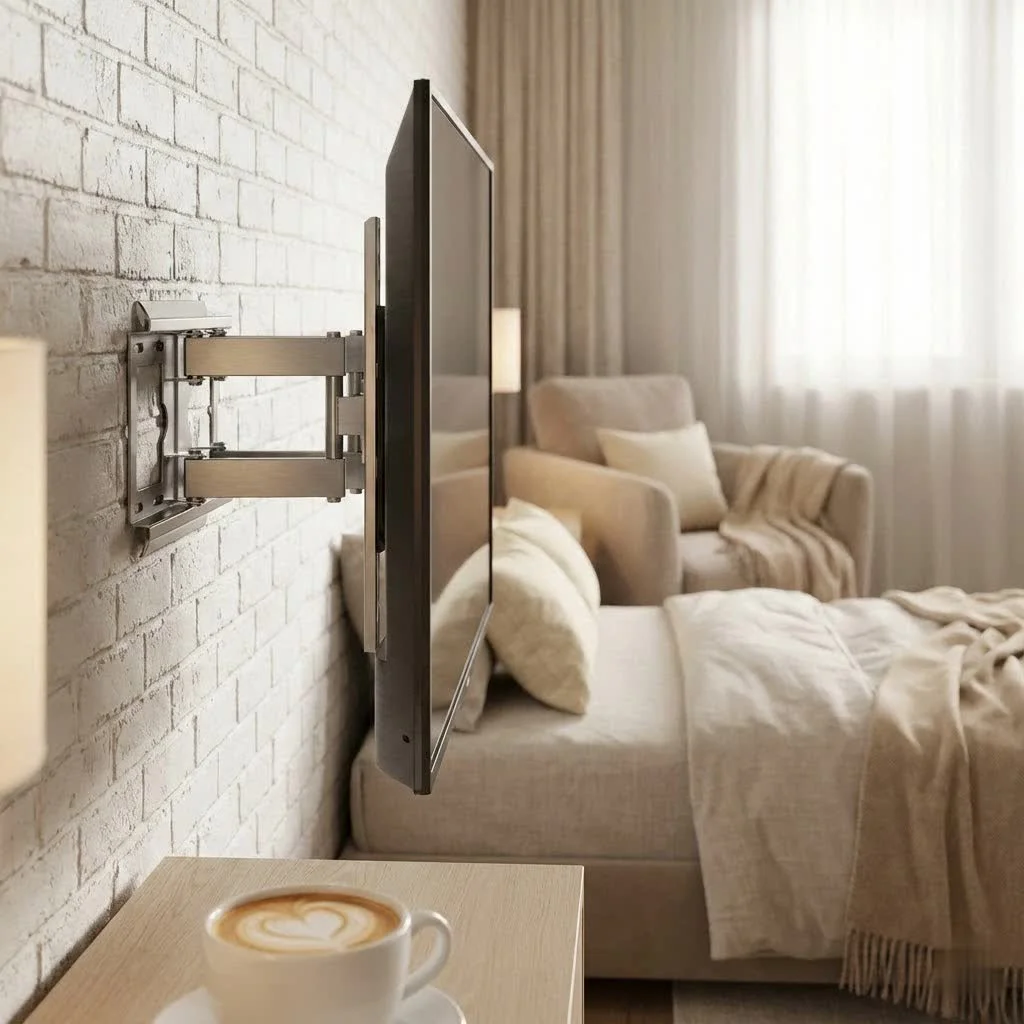
Why a 65-Inch TV Mount is a major upgrade for Your Home Entertainment
Wall mounting your 65-inch TV goes beyond mere preference; it fundamentally changes your viewing environment for the better.
Space Optimization
Say goodbye to bulky TV stands and cluttered media consoles. A 65-inch TV mount frees up valuable floor space, making your room feel larger and more open. This minimalist approach not only enhances your decor but also makes cleaning a breeze. Imagine the possibilities for new furniture arrangements or simply enjoying an uncluttered living area.
Enhanced Viewing Experience
One of the most significant advantages of a wall mount is the ability to position your 65-inch TV at the optimal viewing height and angle. This ergonomic benefit drastically reduces neck and eye strain, allowing for more comfortable, extended viewing sessions. No more craning your neck or dealing with annoying glares from windows or lights.
Safety and Security
A properly installed 65-inch TV mount provides a secure anchor for your television, safeguarding it from accidental bumps or toppling, especially crucial in homes with children or pets. When mounted correctly into wall studs, your TV is as safe as it can be.
Decoding 65-Inch TV Mount Types: Which One is Right for You?
Not all 65-inch TV mounts are created equal. Understanding the different types available is key to selecting the perfect one for your space and viewing habits.
Fixed Mounts: The Streamlined Solution
Fixed mounts are designed to hold your 65-inch TV flat against the wall, offering the most low-profile and minimalist look. They keep your television incredibly close to the wall, often leaving just a tiny gap, which is fantastic for a clean aesthetic.
- Pros: Sleek, secure, generally the most affordable and easiest to install.
- Cons: No adjustability once installed; your viewing angle is static.
- Ideal for: Rooms where you watch TV from a consistent, direct viewing position.
Tilting Mounts: Battling Glare with Ease
A tilting 65-inch TV mount allows you to adjust the vertical angle of your screen, typically by up to 15 degrees. This feature is a lifesaver in rooms where sunlight or overhead lighting can cause glare.
- Pros: Excellent for reducing glare, offers some flexibility for slightly higher mounting positions (like above a fireplace), and usually still maintains a relatively low profile.
- Cons: Only vertical adjustment; no horizontal swivel or extension.
- Ideal for: Spaces with variable lighting conditions or when you need to mount the TV a bit higher than eye level.
Full-Motion (Articulating) Mounts: Unrivaled Flexibility
|
Our Picks for the Best TV Mount in 2026
As an Amazon Associate I earn from qualifying purchases.
|
||
| Num | Product | Action |
|---|---|---|
| 1 | Perlegear Full Motion TV Wall Mount for Most 42–86 inch Flat Curved TVs up to 132 lbs, 12″/16″ Wood Studs, Bracket with Articulating Arms, Swivel, Tool-Free Tilt, Max VESA 600x400mm PGLF12 |

|
| 2 | Mounting Dream TV Wall Mount for 32-65 Inch Television,Mount with Swivel and Tilt, Full Motion Bracket with Articulating Dual Arms, Fits 16inch Studs, Max VESA 400X400 mm, 99lbs, MD2380 |
|
| 3 | MOUNTUP Full Motion TV Wall Mount for Most 26-60 Inch TVs, Max VESA 400x400mm Wall Mount TV Bracket with Swivel Tilting Extension Level Adjustment for LED LCD Flat Curved TVs Up to 77 LBS, MU0018 |
|
| 4 | USX MOUNT Full Motion TV Wall Mount for Most 32-70 inch TVs up to 99 lbs, Wall Mount Bracket with Dual Articulating Arms, Swivel, Tilt, Max VESA 400x400mm, TV Mount Fits 12”/16” Wood Studs |
|
| 5 | Mounting Dream TV Wall Mount for Most 37-75 Inch TVs, Universal Tilt TV Mount Fit 16\", 18\", 24\" Stud with Loading Capacity 132lbs, Max Vesa 600 x 400mm, Low Profile Flat Wall Mount TV Bracket |
|
| 6 | Pipishell Full Motion TV Wall Mount for Echo Show 21/15 and 13-43 Inch Flat Curved Screen TVs & Monitors, Max VESA 200x200mm up to 44lbs, TV Mount Wall Bracket with Rotation Swivel Tilt Extension |
|
| 7 | Magnetic Monitor Wall Mount for Steel Surfaces, Fits 13 to 34 Inch Screens, Holds up to 22 lbs, VESA 75/100 Compatible Wall Mount for Computer and TV Monitor, No-Drill Installation with All Screws |
|
| 8 | monTEK Motorized Ceiling TV Mount for 43-86 Inch TVs, Heavy-Duty 121lbs (4X Load Tested), Off-Center VESA Compatible, Electric Flip Down with Remote/App/Voice Control, Fits Flat & Pitched Roof |
|
| 9 | Amazon Basics Full Motion Articulating TV Wall Mount, with Swivel and Tilt, for 26\" to 55\" TVs and Flat Panels up to 80 Lbs, VESA Compatible, Black |
|
| 10 | USX Mount Full Motion TV Wall Mount for Most 42-90 inch Flat Screen/LED/4K, TV Mount Bracket Dual Swivel Articulating Tilt 6 Arms, Max 16\" Wood Studs, VESA 600x400mm, Holds up to 132lbs |
|
If you crave ultimate flexibility, a full-motion, or articulating, 65-inch TV mount is your champion. These mounts can extend away from the wall, swivel horizontally (sometimes up to 180 degrees), and tilt vertically.
- Pros: Provides multiple viewing angles from different spots in a room, allows easy access to ports for cable management, and is perfect for corner installations or unconventional layouts.
- Cons: Typically more expensive, requires a more involved installation due to its moving parts, and protrudes more from the wall when retracted.
- Ideal for: Large open-plan rooms, multi-purpose spaces, or whenever you need to adjust your viewing angle frequently.
Specialty Mounts
While less common for standard living room setups, you might encounter specialty mounts like ceiling mounts (perfect for bedrooms or commercial spaces) or outdoor mounts, which are weather-resistant and designed for patios or decks. Each serves a niche, offering unique solutions for specific needs.
The Essential Checklist: Choosing the Perfect 65-Inch TV Mount
Before you make a purchase, there are critical factors to consider to ensure your 65-inch TV mount is compatible, safe, and meets your needs.
VESA Compatibility: The Universal Language of TV Mounts
VESA (Video Electronics Standards Association) is a global standard that defines the spacing of the mounting holes on the back of your TV. For your 65-inch TV mount, this is perhaps the most crucial compatibility factor. Common VESA patterns for 65-inch TVs include 400x400mm, 600x400mm, or sometimes even 600x600mm.
- How to find it: Check your TV’s manual, the manufacturer’s website, or simply measure the horizontal and vertical distance between the bolt holes on the back of your TV (in millimeters). Ensure the 65-inch TV mount you choose supports this exact VESA pattern.
Weight Capacity: Safety First, Always
This is non-negotiable. Your 65-inch TV mount must be rated to safely hold the weight of your television. While 65-inch TVs have become lighter over the years, their weight can still vary significantly, often ranging from 40 to 80 pounds. Always check your TV’s specifications for its exact weight and choose a mount with a weight capacity that comfortably exceeds it. A mount capable of holding 99 lbs or 135 lbs is a good general benchmark for a 65-inch TV.
Wall Type and Stud Spacing: Your Foundation for Security
The type of wall you have (wood stud, concrete, brick, drywall) will dictate your installation method. For a heavy 65-inch TV, mounting directly into wood studs is paramount for security.
- Studs: Wood studs are the strongest points in your wall, typically spaced 12, 16, or 24 inches apart. Your 65-inch TV mount’s wall plate needs to align with at least two studs.
- Drywall Warning: Never mount a 65-inch TV directly onto plain drywall using only hollow wall anchors. The weight is simply too much, and it risks catastrophic failure. If your studs are too far apart for the mount’s wall plate, or if you only have drywall, you’ll need to reinforce the wall, perhaps by adding a sturdy wood panel board across multiple studs, or hiring a professional.”A great TV is only as good as its mount. Don’t cut corners on stability or compatibility,” advises Liam Thompson, a veteran AV installer with two decades of experience.
Room Layout and Viewing Habits: Tailoring to Your Lifestyle
Consider where you’ll be watching.
- Viewing Distance: A general rule of thumb is 1.5 times the diagonal screen size for comfortable viewing. For a 65-inch TV, that’s roughly 97.5 inches or about 8 feet.
- Optimal Height: For seated viewing, the center of your 65-inch TV should ideally be at eye level, which is typically around 42 inches from the floor. Since a 65-inch TV is roughly 32 inches tall, this usually means the bottom edge of the TV will be around 25 to 26 inches from the floor. Adjust this slightly if you primarily stand while watching or have other furniture constraints.
Step-by-Step Installation: Mounting Your 65-Inch TV Like a Pro
Ready to get that gorgeous 65-inch TV on the wall? Here’s a professional workflow to ensure a safe and secure installation.
Gather Your Tools and Prep the Area
Before you start, gather everything you’ll need. This includes a reliable stud finder, a power drill with appropriate bits, a level, a measuring tape, screwdrivers, and a wrench. Always ensure your TV is unplugged and clear the area of any furniture or obstructions to prevent accidents. Safety first!
Locate and Mark Your Studs
This is a critical step. Use your stud finder to precisely locate the center of at least two adjacent wooden studs where your 65-inch TV mount will attach. Mark these centers clearly with a pencil. Double-check your measurements to confirm the studs are within the width of your mount’s wall plate.
Determine Optimal TV Height and Mount Placement
With your studs marked, hold the wall plate of your 65-inch TV mount against the wall. Use your calculations for optimal eye-level viewing (center of TV at about 42 inches from the floor) to determine the ideal vertical position. Use a level to ensure the wall plate is perfectly horizontal before marking the drill points for the lag bolts that will secure it.
Secure the Wall Plate
Using your drill, create pilot holes at the marked points. The size of the drill bit should match the shaft of your lag bolts, not including the threads. Once pilot holes are ready, position the wall plate, insert the lag bolts, and use your wrench to tighten them securely into the studs. Make sure it’s snug and doesn’t wiggle. Over-tightening can strip the wood, so be firm but careful.
Attach Mounting Brackets to Your 65-Inch TV
Carefully lay your 65-inch TV face down on a soft, clean surface (like a blanket on a table). Identify the VESA mounting holes on the back. Your TV mount will come with various screws; select the correct length and diameter that fit snugly into your TV’s threaded inserts. Attach the two vertical brackets to the back of your TV. Ensure they are aligned correctly and tightened firmly, but again, avoid overtightening. If your TV has a curved back, you might need spacers (often included with the mount) to create a flat surface.
Carefully Hang Your TV
This is typically a two-person job, especially for a 65-inch TV. With a helper, lift your television and carefully hook the brackets on the back of the TV onto the wall plate. Most mounts have a locking mechanism to prevent the TV from accidentally coming off the wall. Engage these locks. Once the TV is securely hung, make any final tilt or swivel adjustments your specific 65-inch TV mount allows.
The Finishing Touches: Cable Management and Aesthetics
A beautifully mounted 65-inch TV can lose its visual appeal with a tangled mess of cables.
- In-Wall Cable Management: For the cleanest look, consider an in-wall cable management kit. This involves cutting small holes in your drywall (below the TV and near an outlet) to route cables behind the wall.
- Cable Raceways/Covers: If cutting into walls isn’t an option, external cable raceways or covers can be painted to match your wall color, neatly concealing wires.
- Cable Ties and Sleeves: Simple cable ties and sleeves can bundle loose wires behind the TV, keeping them organized and out of sight.
Common Pitfalls and How to Avoid Them
Even seasoned DIYers can make mistakes. Here are common issues and how to steer clear:
- Not Finding Studs: Relying solely on drywall anchors for a 65-inch TV is a recipe for disaster. Always locate and attach to studs.
- Incorrect VESA/Weight Match: Double-check your TV’s VESA pattern and weight against the mount’s specifications. A mismatch can lead to instability or damage.
- Overtightening Screws: This can strip screw threads on both the TV and the wall, weakening the connection. Tighten firmly, but don’t force it.
- Ignoring Instructions: Every 65-inch TV mount is slightly different. Always read and follow the manufacturer’s specific installation guide.
Frequently Asked Questions (FAQ)
Q: Can I mount a 65-inch TV on drywall?
A: No, you should not mount a 65-inch TV directly onto plain drywall with only drywall anchors. The weight of a 65-inch TV is too significant for most drywall anchors, risking the TV falling and causing serious damage. Always anchor your 65-inch TV mount into wall studs or use appropriate wall reinforcement if studs are unavailable or spaced too widely.
Q: What VESA size do most 65-inch TVs use?
A: While VESA patterns vary, common sizes for a 65-inch TV include 400x400mm, 600x400mm, or sometimes 600x600mm. Always consult your TV’s manual or measure the horizontal and vertical distances between the mounting holes on the back of your television to confirm the exact VESA standard.
Q: How high should I mount my 65-inch TV?
A: For optimal seated viewing, the center of your 65-inch TV screen should be at eye level, which is typically around 42 inches from the floor. Given that a 65-inch TV is approximately 32 inches in height, this usually means the bottom edge of the TV will be around 25 to 26 inches from the floor. Adjust based on your primary viewing position (seated vs. standing).
Q: Do all 65-inch TV mounts come with hardware?
A: Most new 65-inch TV mounts come with a comprehensive hardware kit, including various sizes of screws, washers, and spacers for both TV attachment and wall installation (lag bolts, concrete anchors). However, it’s always a good idea to check the product description to ensure all necessary components are included, especially the correct VESA screws for your TV.
Q: Is it safe to install a 65-inch TV mount myself?
A: Yes, installing a 65-inch TV mount can be a safe and rewarding DIY project if you follow all instructions carefully, use the right tools, and prioritize safety. The most critical aspects are accurately locating wall studs, ensuring VESA and weight compatibility, and having a helper for lifting the TV. If you feel unsure at any point, consider hiring a professional.
Conclusion
Mounting your 65-inch TV is a fantastic way to improve your home entertainment setup, providing a sleek aesthetic, freeing up space, and optimizing your viewing experience. By understanding the different 65-inch TV mount types, carefully considering compatibility and wall structure, and following a methodical installation process, you can achieve a professional and secure result. At Dikfu, we believe anyone can master the art of TV mounting. Take your time, trust the process, and soon you’ll be enjoying your magnificent 65-inch display in its perfect, wall-mounted glory.
Frequently Asked Questions
Can a 65-inch TV be mounted on drywall without studs?
No, you should not mount a 65-inch TV directly onto plain drywall with only drywall anchors. The weight of a 65-inch TV, typically ranging from 40 to 80 pounds, is too significant for most drywall anchors, risking the TV falling and causing serious damage. Always anchor your 65-inch TV mount into wall studs or use appropriate wall reinforcement if studs are unavailable or spaced too widely.
What VESA pattern is common for a 65-inch television?
While VESA patterns vary, common sizes for a 65-inch TV include 400x400mm, 600x400mm, or sometimes 600x600mm. Always consult your TV's manual or measure the horizontal and vertical distances between the mounting holes on the back of your television to confirm the exact VESA standard before purchasing a mount.
What is the optimal height to mount a 65-inch TV?
For optimal seated viewing, the center of your 65-inch TV screen should be at eye level, which is typically around 42 inches from the floor. Given that a 65-inch TV is approximately 32 inches in height, this usually means the bottom edge of the TV will be around 25 to 26 inches from the floor. Adjust this height based on your primary viewing position (seated vs. standing) and furniture constraints.
Does a 65-inch TV mount include all necessary installation hardware?
Most new 65-inch TV mounts come with a comprehensive hardware kit, including various sizes of screws, washers, and spacers for both TV attachment and wall installation (lag bolts, concrete anchors). However, it's always a good idea to check the product description to ensure all necessary components are included, especially the correct VESA screws for your specific TV model.
Is it safe for a DIYer to install a 65-inch TV mount?
Yes, installing a 65-inch TV mount can be a safe and rewarding DIY project if you follow all instructions carefully, use the right tools, and prioritize safety. The most critical aspects are accurately locating wall studs, ensuring VESA and weight compatibility, and having a helper for lifting the TV. If you feel unsure at any point, consider hiring a professional installer.
How to Install a 65-Inch TV Mount
Follow these steps to safely and securely install your 65-inch TV mount, ensuring optimal viewing and stability.
Collect all necessary tools, including a stud finder, power drill, level, measuring tape, screwdrivers, and a wrench. Unplug your TV and clear the installation area of any furniture or obstructions to prevent accidents and ensure safety.
Use a reliable stud finder to precisely locate the center of at least two adjacent wooden studs where the mount's wall plate will attach. Mark these centers clearly with a pencil. Confirm the studs are within the width of your mount's wall plate for secure attachment.
Based on optimal eye-level viewing (center of TV at about 42 inches from the floor), determine the ideal vertical position for the wall plate. Hold the wall plate against the wall, use a level to ensure it's perfectly horizontal, and mark the drill points for the lag bolts.
Drill pilot holes at the marked points using a drill bit that matches the lag bolt shaft. Position the wall plate, insert the lag bolts, and use a wrench to tighten them securely into the studs. Ensure the plate is snug and does not wiggle, being careful not to overtighten and strip the wood.
Lay your 65-inch TV face down on a soft surface. Attach the two vertical mounting brackets to the VESA holes on the back of the TV using the correct screws and spacers. With a helper, lift the TV and carefully hook the brackets onto the wall plate, engaging any locking mechanisms. Make final tilt or swivel adjustments as needed.
Get our weekly buyer guide
Practical specs, not advice. Unsubscribe anytime.
Upgrading to a wall-mounted 65-inch TV has truly transformed my home entertainment setup. The space optimization is incredible; my media console looks so much cleaner now. I made sure to double-check the weight capacity, and everything feels super secure. It’s a game-changer for sure.
I finally got around to mounting my 65-inch TV, and this guide was a lifesaver. I was really worried about the weight capacity, but understanding the VESA compatibility and checking my TV’s specs made it so much easier. My living room feels so much bigger now without the old TV stand. Definitely recommend taking the time to do it right!
I went with a full-motion mount for my 65-inch TV, and it’s been fantastic for adjusting the viewing angle from different spots in the room. The tip about ensuring you hit wood studs was super important; I wouldn’t have felt comfortable otherwise. Installation took a bit longer than I expected, but the result is worth it for the flexibility.
The fixed mount I chose for my 65-inch TV works fine for the most part, but I do wish I’d considered a tilting option. Sometimes the glare from the window is a bit much, and I can’t adjust it. It’s secure and looks clean, but next time I’ll definitely go for something with a bit more flexibility.