So, you’ve invested in a magnificent 65-inch TV – congratulations! Now comes the crucial next step: how to display it safely and stylishly to truly transform your living space. As the resident expert at Dikfu.com, with over 15 years of hands-on experience, I’ve seen it all when it comes to TV mounting. Choosing the right tv mount stand 65 inch setup isn’t just about getting it off the floor; it’s about optimizing your viewing experience, reclaiming valuable space, and ensuring your prized possession is secure. Let’s dive in and unlock the secrets to a flawless entertainment setup.
Understanding Your 65-inch TV’s Needs
Before we explore the options, it’s vital to understand what your specific 65-inch TV requires. These large screens, while stunning, demand proper support. Neglecting these details can lead to disaster, and nobody wants that! For see our tv mounts recommendations on this site.
The Weight and VESA Standard Dance
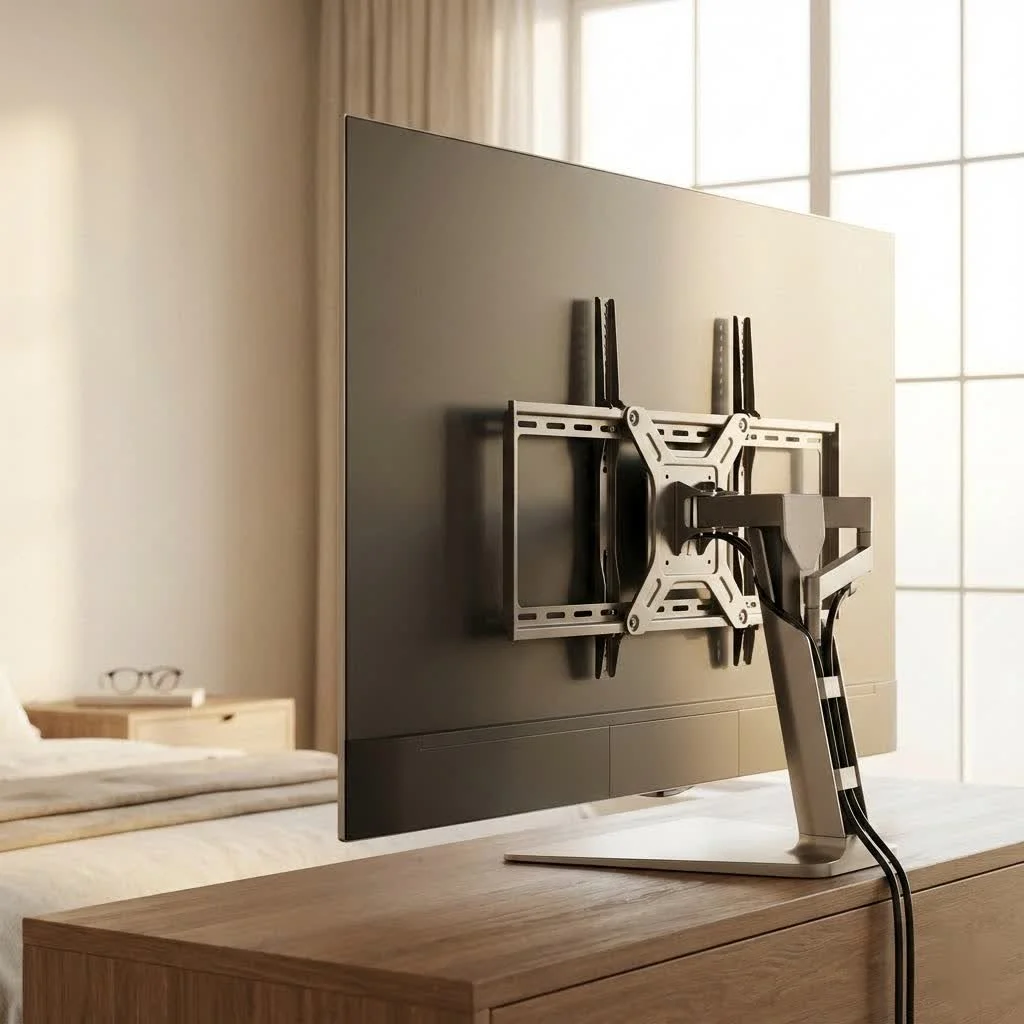
Every TV has a weight and a VESA mounting pattern. The VESA (Video Electronics Standards Association) standard dictates the pattern of screw holes on the back of your TV, which your mount or stand needs to match. For most 65-inch TVs, you’ll commonly find VESA patterns like 400x400mm or even 600x400mm, though it’s always best to check your TV’s manual. Don’t guess here; it’s a critical measurement.
Crucially, your mount or stand must also comfortably support your TV’s weight. Always choose a product with a weight capacity at least 25% higher than your TV’s actual weight for an added safety margin. Overloading a mount or stand is a recipe for disaster.
Wall Mount vs. TV Stand: Making the Right Choice
This is often the first big decision. Both wall mounts and TV stands with integrated mounts offer distinct advantages for a 65-inch TV.
The Allure of Wall Mounts
Wall mounts offer that sleek, minimalist aesthetic, making your TV look like a piece of art floating on the wall. They’re fantastic for saving floor space and preventing tip-overs when correctly installed.
- Fixed Wall Mounts: These keep your TV almost flush against the wall. They are the most discreet and often the most affordable option, ideal if you have a dedicated viewing spot and no glare issues.
- Tilting Wall Mounts: Perfect for reducing glare from windows or lights, or if your TV is mounted higher (like above a fireplace). They allow you to tilt the screen vertically for a better viewing angle.
- Full-Motion (Articulating) Wall Mounts: The ultimate in flexibility. These mounts extend, retract, tilt, and swivel, allowing you to achieve the perfect viewing angle from multiple spots in a room. They are preferred by many home theater enthusiasts. However, for a 65-inch TV, ensure you have robust wall studs and extra caution during installation due to the larger leverage and weight.
The Versatility of TV Mount Stands
A “TV mount stand 65 inch” setup combines a traditional TV stand with an integrated mounting pole, giving you the best of both worlds. These are perfect when:
- Wall Mounting Isn’t Possible: Perhaps you’re in a rental, have unique wall materials, or just prefer not to drill into your walls.
- You Need Storage: Many stands come with shelves, cabinets, and drawers for media devices, gaming consoles, and accessories, providing excellent organization and cable management solutions.
- You Desire Mobility: Some TV mount stands come with wheels, allowing you to move your 65-inch TV between rooms or adjust its position easily. However, be wary of flimsy designs, as instability can be a major issue for larger, heavier TVs.
“When considering a TV mount stand for a 65-inch TV, don’t just look at aesthetics,” advises [Expert Name] Anya Sharma, a seasoned AV installation specialist. “The structural integrity, especially for the integrated mount, is paramount. You need that stability, or you’re simply creating a beautiful hazard.”
Choosing the Perfect Fit: Key Considerations for Your 65-inch TV
|
Our Picks for the Best TV Mount in 2026
As an Amazon Associate I earn from qualifying purchases.
|
||
| Num | Product | Action |
|---|---|---|
| 1 | monTEK Motorized Ceiling TV Mount for 43-86 Inch TVs, Heavy-Duty 121lbs (4X Load Tested), Off-Center VESA Compatible, Electric Flip Down with Remote/App/Voice Control, Fits Flat & Pitched Roof |

|
| 2 | Mounting Dream TV Wall Mount for 32-65 Inch Television,Mount with Swivel and Tilt, Full Motion Bracket with Articulating Dual Arms, Fits 16inch Studs, Max VESA 400X400 mm, 99lbs, MD2380 |
|
| 3 | Pipishell Full Motion TV Wall Mount for Echo Show 21/15 and 13-43 Inch Flat Curved Screen TVs & Monitors, Max VESA 200x200mm up to 44lbs, TV Mount Wall Bracket with Rotation Swivel Tilt Extension |
|
| 4 | USX Mount Full Motion TV Wall Mount for Most 42-90 inch Flat Screen/LED/4K, TV Mount Bracket Dual Swivel Articulating Tilt 6 Arms, Max 16\" Wood Studs, VESA 600x400mm, Holds up to 132lbs |
|
| 5 | USX MOUNT Full Motion TV Wall Mount for Most 32-70 inch TVs up to 99 lbs, Wall Mount Bracket with Dual Articulating Arms, Swivel, Tilt, Max VESA 400x400mm, TV Mount Fits 12”/16” Wood Studs |
|
| 6 | MOUNTUP Full Motion TV Wall Mount for Most 26-60 Inch TVs, Max VESA 400x400mm Wall Mount TV Bracket with Swivel Tilting Extension Level Adjustment for LED LCD Flat Curved TVs Up to 77 LBS, MU0018 |
|
| 7 | Perlegear Full Motion TV Wall Mount for Most 42–86 inch Flat Curved TVs up to 132 lbs, 12″/16″ Wood Studs, Bracket with Articulating Arms, Swivel, Tool-Free Tilt, Max VESA 600x400mm PGLF12 |
|
| 8 | Mounting Dream TV Wall Mount for Most 37-75 Inch TVs, Universal Tilt TV Mount Fit 16\", 18\", 24\" Stud with Loading Capacity 132lbs, Max Vesa 600 x 400mm, Low Profile Flat Wall Mount TV Bracket |
|
| 9 | Amazon Basics Full Motion Articulating TV Wall Mount, with Swivel and Tilt, for 26\" to 55\" TVs and Flat Panels up to 80 Lbs, VESA Compatible, Black |
|
| 10 | Magnetic Monitor Wall Mount for Steel Surfaces, Fits 13 to 34 Inch Screens, Holds up to 22 lbs, VESA 75/100 Compatible Wall Mount for Computer and TV Monitor, No-Drill Installation with All Screws |
|
Whether you go for a wall mount or a stand, several factors will influence your decision and ensure optimal performance.
- Screen Size and Width: For a TV stand, it should be at least as wide as your 65-inch TV, ideally 5 to 10 inches wider, to ensure stability and visual balance. A 65-inch TV typically measures 57-60 inches wide, so a stand in the 65-70 inch range is often ideal.
- Viewing Height: The center of your 65-inch TV screen should be at eye level when you’re seated. This usually means the stand should be around 40-42 inches high, depending on your seating, or your wall mount positioned accordingly. Adjustable height features on stands or mounts offer greater flexibility.
- Viewing Distance: For a 65-inch TV, the recommended viewing distance is generally 1.5 to 2.5 times the diagonal screen size. This helps create an immersive yet comfortable viewing experience.
- Room Layout and Aesthetics: Consider the overall design of your room. A minimalist setup might benefit from a sleek wall mount, while a room needing more storage or a focal point might suit a robust TV stand.
- Cable Management: This is often overlooked but crucial for a clean look. Many stands have built-in cable management systems, while wall mounts often require external solutions like cable raceways or in-wall cable kits.
Step-by-Step Wall Mount Installation Guide for Your 65-inch TV
If you’re opting for a wall mount, here’s a general overview of the installation process. Remember, safety first, and always consult your specific mount’s instructions.
What You’ll Need: A Checklist
- Your 65-inch TV wall mount kit
- Stud finder
- Level
- Pencil
- Drill and appropriate drill bits (usually 3/16-inch or as specified by the mount)
- Socket wrench or adjustable wrench
- Screwdriver (Phillips and/or flathead)
- Tape measure
- Safety glasses
- An assistant (crucial for a 65-inch TV!)
The Installation Process
- Locate Wall Studs: Use a reliable stud finder to locate at least two strong wooden studs in your wall. Mark their centers clearly. For a 65-inch TV, mounting to studs is absolutely essential for safety; never rely solely on drywall anchors. If studs are too far apart for your mount, you might need to install a wooden backing board securely spanning multiple studs.
- Determine Mount Position: With your assistant, hold the wall bracket up to the wall at your desired viewing height. Use a level to ensure it’s perfectly straight and mark the drilling holes with a pencil.
- Pre-Drill Pilot Holes: Using the correct drill bit, drill pilot holes into the center of your marked stud locations. Ensure the holes are deep enough as per your mount’s instructions.
- Attach Wall Plate: Secure the wall plate to the studs using the lag bolts provided with your mount. Tighten them firmly with a socket wrench. Do not overtighten, but ensure there’s no wobble.
- Attach TV Brackets: Lay your 65-inch TV face down on a clean, soft surface (like a blanket on a table). Attach the TV-side mounting brackets to the VESA holes on the back of your TV using the appropriate screws and spacers from your kit. Ensure they are securely fastened.
- Hang the TV: This is where your assistant is indispensable. Carefully lift the TV together and hook or slide the TV brackets onto the wall plate. Most mounts have a locking mechanism; engage this to prevent accidental dislodgement.
- Adjust and Level: Make any final adjustments to tilt, swivel, or level your TV as per your mount’s features.
Pro Tips for a Clean and Professional Look
Once your 65-inch TV is securely in place, it’s time to refine the setup for that “Dikfu-level” finish.
Cable Management Mastery
Tangled cables can ruin even the most sophisticated setup.
- In-Wall Cable Kits: For wall-mounted TVs, an in-wall cable management kit can discreetly route power and HDMI cables through the wall, creating an incredibly clean look.
- Cable Sleeves and Raceways: If in-wall routing isn’t an option, cable sleeves or paintable raceways can neatly bundle and hide cables along the wall or behind the TV stand.
- Integrated Stand Features: Many quality TV mount stands come with cutouts and channels in the back panel to route wires, keeping them out of sight.
Aesthetic Touches
- Optimal Lighting: Consider bias lighting behind your TV to reduce eye strain and enhance perceived contrast, adding a sophisticated glow.
- Decor Integration: Integrate your TV into your room’s decor with well-chosen art, plants, or shelving around your mounted TV or on your TV stand.
Common Mistakes and How to Avoid Them
Even seasoned DIYers can make mistakes. Learn from them!
- Not Checking VESA/Weight Capacity: This is the most critical error. Always double-check your TV’s specifications against the mount’s capabilities.
- Mounting to Drywall Only: For a 65-inch TV, this is extremely dangerous. Always secure the mount to solid wooden studs.
- Incorrect Height: Don’t mount your TV too high! Eye-level viewing is key for comfort and immersion.
- Ignoring Cable Management: This leads to unsightly clutter. Plan your cable routing before you even start drilling.
- Skipping the Assistant: A 65-inch TV is heavy and unwieldy. Don’t try to lift or position it alone; you risk injury to yourself and damage to your TV.
Frequently Asked Questions about 65-inch TV Mounts and Stands
-
Q: What size TV stand is best for a 65-inch TV?
A: For optimal stability and aesthetic balance, your TV stand should be at least 5 to 10 inches wider than your 65-inch TV. Since most 65-inch TVs are around 57-60 inches wide, aim for a stand in the 65-70 inch width range. -
Q: Can I use a full-motion mount for a 65-inch TV?
A: Yes, full-motion (articulating) mounts are available for 65-inch TVs and offer great flexibility. However, it is crucial to ensure the mount is rated for your TV’s weight and that it is securely anchored into robust wall studs. -
Q: What is the ideal viewing height for a 65-inch TV?
A: The ideal viewing height places the center of your 65-inch TV screen at eye level when you are seated comfortably. This typically means a TV stand around 40-42 inches high, or the wall mount positioned accordingly. -
Q: Do 65-inch TV stands with integrated mounts provide good cable management?
A: Many high-quality 65-inch TV stands with integrated mounts include features like cutouts in the back panel and sometimes even internal channels to help manage and conceal cables, leading to a much cleaner entertainment area. -
Q: What is VESA, and why is it important for my 65-inch TV mount?
A: VESA (Video Electronics Standards Association) is a standard for the four-hole pattern on the back of your TV that a mount or stand uses to attach. It’s crucial because your chosen mount or stand must have a VESA pattern that matches your 65-inch TV for compatibility.
The Dikfu.com Seal of Approval
Choosing the right tv mount stand 65 inch for your large screen is a decision that impacts not just your entertainment but also the safety and aesthetics of your home. By understanding the different types of mounts and stands, paying close attention to VESA compatibility and weight capacity, and following proper installation techniques, you can confidently create an impressive and secure entertainment hub. Don’t rush, measure twice, and if in doubt, consider professional installation. Your 65-inch TV deserves a setup that’s as grand as the viewing experience it provides. Now go forth and enjoy your perfectly positioned big screen!
Get our weekly buyer guide
Practical specs, not advice. Unsubscribe anytime.
