As a seasoned expert with over 15 years in TV mount installation and a core content creator for Dikfu.com, I’ve seen countless setups, from the simplest fixed mounts to complex multi-articulating systems. Mounting your 50-inch TV on the wall isn’t just about saving space; it’s about transforming your viewing experience, decluttering your room, and adding a touch of modern sophistication. A properly installed TV wall mount for your 50-inch TV elevates your entertainment, but getting it right requires a bit of know-how. This comprehensive guide will walk you through everything, ensuring you can confidently select and install the perfect mount for your home.
Why Wall Mount Your 50-Inch TV?
Opting for a TV wall mount for your 50-inch TV brings a host of benefits that go beyond just aesthetics. First, it’s a fantastic space-saver, freeing up valuable floor space that a TV stand would otherwise occupy, making your room feel larger and more open. This is especially beneficial in smaller living areas or bedrooms. Second, a wall-mounted TV creates a sleek, minimalist look, effectively turning your television into a focal point rather than just another piece of furniture. Lastly, and perhaps most importantly, mounting your TV securely to the wall significantly enhances safety, preventing accidental tipping, which is crucial if you have children or pets.
Understanding TV Mount Types: Which One is Right for Your 50-Inch Screen?
Choosing the right type of TV wall mount for your 50-inch TV is paramount. Each type offers different functionalities and aesthetics, catering to various viewing preferences and room layouts.
Fixed Mounts: The Streamlined Choice
Fixed TV mounts are the simplest and most low-profile option. They hold your 50-inch TV flat and close to the wall, much like a picture frame. This type is ideal if you have a dedicated viewing area and don’t need to adjust the screen angle. They offer a clean, minimalist look, but keep in mind that accessing cables behind the TV will require temporarily removing it from the mount.
Tilting Mounts: Perfect for Glare Reduction
Tilting TV mounts allow you to adjust your 50-inch TV vertically, typically by tilting it a few degrees up or down. These are perfect for rooms where your TV might be mounted higher than eye level, such as above a fireplace, or if you frequently experience glare from windows or overhead lighting. The tilt feature helps you achieve a comfortable viewing angle and minimize reflections without extending the TV far from the wall.
Full-Motion (Articulating) Mounts: Maximum Flexibility
|
Our Picks for the Best TV Mount in 2026
As an Amazon Associate I earn from qualifying purchases.
|
||
| Num | Product | Action |
|---|---|---|
| 1 | Amazon Basics Full Motion Articulating TV Wall Mount, with Swivel and Tilt, for 26\" to 55\" TVs and Flat Panels up to 80 Lbs, VESA Compatible, Black |

|
| 2 | Perlegear Full Motion TV Wall Mount for Most 42–86 inch Flat Curved TVs up to 132 lbs, 12″/16″ Wood Studs, Bracket with Articulating Arms, Swivel, Tool-Free Tilt, Max VESA 600x400mm PGLF12 |
|
| 3 | USX Mount Full Motion TV Wall Mount for Most 42-90 inch Flat Screen/LED/4K, TV Mount Bracket Dual Swivel Articulating Tilt 6 Arms, Max 16\" Wood Studs, VESA 600x400mm, Holds up to 132lbs |
|
| 4 | MOUNTUP Full Motion TV Wall Mount for Most 26-60 Inch TVs, Max VESA 400x400mm Wall Mount TV Bracket with Swivel Tilting Extension Level Adjustment for LED LCD Flat Curved TVs Up to 77 LBS, MU0018 |
|
| 5 | Magnetic Monitor Wall Mount for Steel Surfaces, Fits 13 to 34 Inch Screens, Holds up to 22 lbs, VESA 75/100 Compatible Wall Mount for Computer and TV Monitor, No-Drill Installation with All Screws |
|
| 6 | USX MOUNT Full Motion TV Wall Mount for Most 32-70 inch TVs up to 99 lbs, Wall Mount Bracket with Dual Articulating Arms, Swivel, Tilt, Max VESA 400x400mm, TV Mount Fits 12”/16” Wood Studs |
|
| 7 | Mounting Dream TV Wall Mount for Most 37-75 Inch TVs, Universal Tilt TV Mount Fit 16\", 18\", 24\" Stud with Loading Capacity 132lbs, Max Vesa 600 x 400mm, Low Profile Flat Wall Mount TV Bracket |
|
| 8 | Mounting Dream TV Wall Mount for 32-65 Inch Television,Mount with Swivel and Tilt, Full Motion Bracket with Articulating Dual Arms, Fits 16inch Studs, Max VESA 400X400 mm, 99lbs, MD2380 |
|
| 9 | monTEK Motorized Ceiling TV Mount for 43-86 Inch TVs, Heavy-Duty 121lbs (4X Load Tested), Off-Center VESA Compatible, Electric Flip Down with Remote/App/Voice Control, Fits Flat & Pitched Roof |
|
| 10 | Pipishell Full Motion TV Wall Mount for Echo Show 21/15 and 13-43 Inch Flat Curved Screen TVs & Monitors, Max VESA 200x200mm up to 44lbs, TV Mount Wall Bracket with Rotation Swivel Tilt Extension |
|
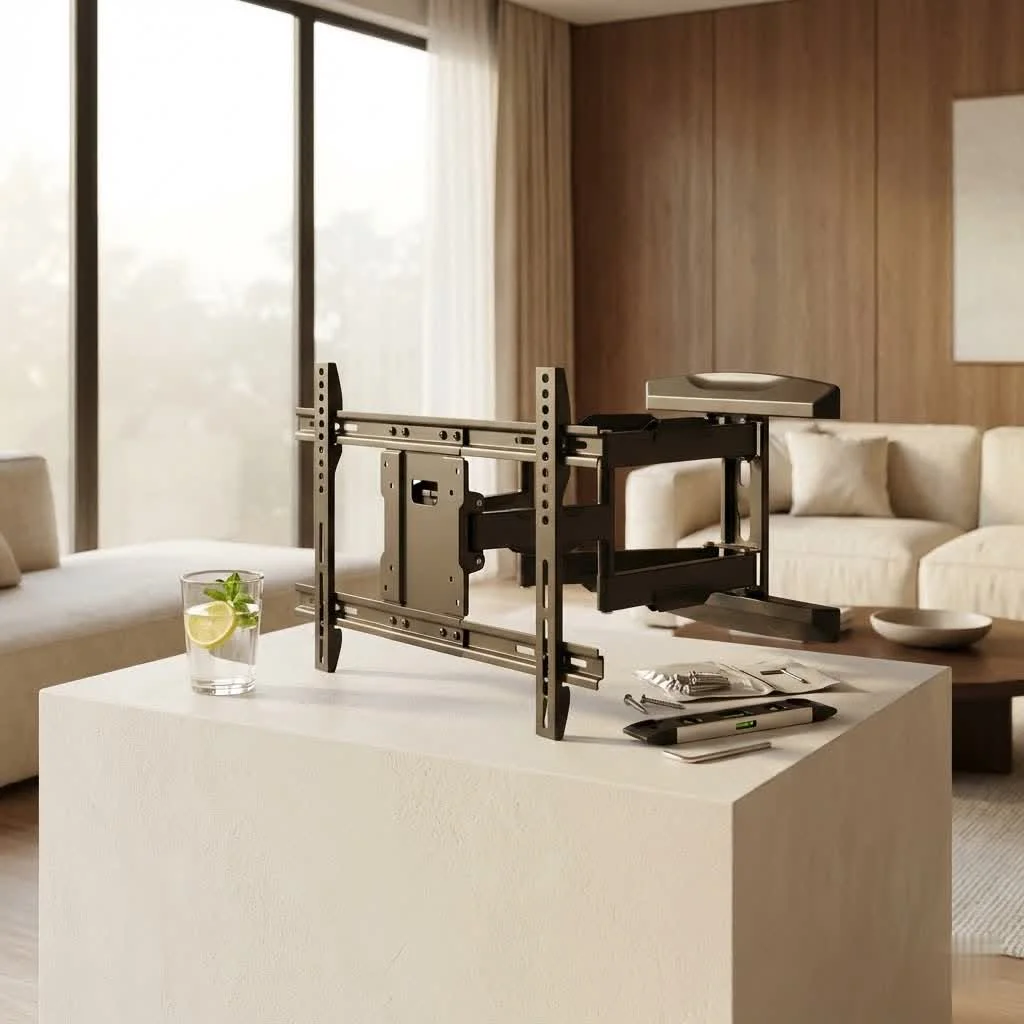
If you desire the ultimate in viewing flexibility, a full-motion, also known as an articulating or swivel, TV wall mount is your go-to. These mounts come with an arm (or dual arms) that allows you to extend your 50-inch TV away from the wall, swivel it left or right, and tilt it up or down. This versatility is excellent for open-concept living spaces, corner installations, or if you need to watch your TV from multiple areas in a room, like from both a kitchen and living room.
Here’s a quick comparison to help you visualize the differences:
| Mount Type | Key Feature | Ideal Use Case | Profile on Wall | Flexibility |
|---|---|---|---|---|
| Fixed | Flat against wall | Single, consistent viewing spot | Ultra-low | Minimal |
| Tilting | Vertical angle adjust | Mounted high, glare reduction | Low | Moderate |
| Full-Motion | Extend, swivel, tilt | Multiple viewing angles, corner placement, cable access | Variable (can extend) | High |
Key Considerations Before You Buy: Matching Your 50-Inch TV to the Perfect Mount
Before you click “add to cart,” there are crucial technical specifications you need to verify to ensure your TV wall mount for your 50-inch TV is a perfect, safe fit.
VESA Compatibility: The Universal Language of TV Mounts
VESA stands for Video Electronics Standards Association, and it’s the universal standard for TV mounting hole patterns. On the back of your 50-inch TV, you’ll find four threaded holes in a square or rectangular pattern. The VESA measurement indicates the horizontal distance followed by the vertical distance between these holes, in millimeters (e.g., 400x400mm). For most 50-inch TVs, common VESA patterns include 200x200mm, 300x300mm, and 400x400mm, though some might vary. You absolutely must match your TV’s VESA pattern with that supported by the mount. You can typically find this information in your TV’s manual or by measuring it yourself.
Weight Capacity: Don’t Underestimate Your TV
It might seem obvious, but failing to check the weight capacity of a TV wall mount for your 50-inch TV is a common and dangerous oversight. While modern 50-inch LED/LCD TVs are much lighter than their older plasma counterparts, they still require a mount rated to safely support their weight. Always ensure the mount’s maximum weight capacity comfortably exceeds your TV’s weight. Overloading a mount can lead to catastrophic failure. For most 50-inch TVs, mounts supporting 80-150 lbs offer a good margin of safety.
Wall Type: Beyond Just Drywall
Not all walls are created equal when it comes to supporting a TV. The type of wall you have dictates the specific hardware and installation method required.
- Wood Stud Walls: Most common in homes, these require drilling into the vertical wood studs behind the drywall. A stud finder is essential.
- Concrete or Brick Walls: These are very sturdy but require specialized concrete or masonry anchors and drill bits.
- Metal Stud Walls: Found in some commercial or newer residential buildings, these also require specific metal-grade anchors.
- Drywall Only: Mounting directly into drywall without hitting a stud is generally not recommended for a 50-inch TV due to its size and weight, even with heavy-duty drywall anchors. While some smaller TVs might get away with it, the risk is too high for a 50-inch screen. Always aim for studs.
“Many people assume all walls are the same, but that’s a recipe for disaster,” advises Marcus Thorne, Dikfu’s Lead Installation Specialist. “The right anchor for the right wall material is non-negotiable for a secure TV wall mount.”
Your Step-by-Step Guide to a Safe 50-Inch TV Mount Installation
Ready to get your 50-inch TV up on the wall? Here’s a detailed, step-by-step guide to ensure a smooth and secure installation.
Pre-Installation Checklist & Planning Your Spot
Before you pick up a drill, gather your tools and plan thoroughly.
Tools You’ll Need:
- TV wall mount kit (with all included hardware)
- Stud finder
- Level (a 24-inch spirit level or laser level is best)
- Power drill with appropriate drill bits (wood bits for studs, masonry bits for brick/concrete)
- Phillips head screwdriver
- Tape measure
- Pencil
- Painter’s tape (optional, for marking)
- Safety goggles
- A helper (essential for a 50-inch TV!)
Planning:
- Ideal Height: The generally accepted optimal viewing height is when the center of your 50-inch TV is at eye level when you’re seated. This usually translates to about 42-48 inches from the floor to the center of the screen, but adjust based on your sofa height and personal preference. Use painter’s tape to mark the TV’s outline on the wall and sit back to test the height.
- Location: Consider viewing angles, glare from windows or lights, and proximity to power outlets and cable ports. Ensure the wall can support the weight.
Finding Your Wall Studs: The Foundation of Security
This is arguably the most critical step. Your 50-inch TV mount must be securely anchored into wall studs (or appropriate concrete/brick).
- Use a Stud Finder: Turn on your stud finder and run it horizontally across the wall in the area you’ve chosen. Mark both edges of each stud you find with a pencil. Studs are typically 16 or 24 inches apart on center.
- Verify: Some stud finders are more accurate than others. You can often confirm a stud by lightly tapping the wall; a hollow sound indicates no stud, while a solid thud means you’ve likely hit one. If you have an electrical outlet nearby, studs are often directly to the left or right of it.
- Mark Drill Points: Using your mount’s wall plate as a template and your level to ensure it’s perfectly straight, mark the precise spots on the studs where you’ll drill your pilot holes. Ensure these marks align perfectly with the mounting holes on the bracket.
Attaching the Mount to Your Wall
With your studs located and marked, it’s time to secure the main bracket.
- Drill Pilot Holes: Using your power drill and the recommended drill bit size (specified in your mount’s manual, usually slightly smaller than the lag bolts), carefully drill pilot holes into the center of your marked stud locations. Ensure the drill is straight and perpendicular to the wall.
- Attach Wall Plate: Have your helper hold the wall plate against the wall, aligning the holes with your newly drilled pilot holes.
- Secure with Lag Bolts: Insert the lag bolts through the wall plate and into the pilot holes. Use your power drill or a ratchet wrench to tighten them. Tighten until the mount is snug and secure against the wall, but be careful not to overtighten, which can strip the wood or damage the drywall. Regularly check with your level to ensure the mount remains perfectly horizontal.
Securing the Brackets to Your TV
While one person works on the wall, the other can prepare the TV.
- Lay TV Face Down: Carefully lay your 50-inch TV face down on a soft, clean surface (like a blanket or the TV’s packaging foam) to protect the screen.
- Align TV Brackets: Locate the mounting brackets that attach directly to the back of your TV. These will have holes that match your TV’s VESA pattern.
- Choose Screws & Spacers: Your mount kit will include various screw sizes. Select the screws that fit your TV’s VESA holes without being too long (which could damage internal components) or too short (insufficient thread). If the screws are too long, or if your TV back isn’t completely flat, use the provided plastic spacers to create a snug fit and prevent over-tightening pressure on the TV’s casing.
- Attach Brackets: Securely attach the TV brackets to the back of your 50-inch TV using the correct screws and washers. Tighten firmly with a Phillips head screwdriver, but again, do not overtighten.
The Grand Finale: Hanging Your TV
This is where your helper becomes indispensable for your 50-inch TV.
- Lift Carefully: With your helper, carefully lift the 50-inch TV. Position the TV brackets over the wall plate.
- Hook & Secure: Gently hook the TV brackets onto the wall plate. Most mounts have a locking mechanism, such as safety screws or pull-down cords, to secure the TV in place. Ensure these are engaged according to the manufacturer’s instructions to prevent the TV from accidentally lifting off the mount.
- Test Movement (if applicable): For tilting or full-motion mounts, gently test the range of motion to ensure everything is functioning correctly and securely.
Finishing Touches: Cable Management & Optimal Viewing
Now that your 50-inch TV is proudly mounted, it’s time to hide those unsightly cables and fine-tune your viewing experience.
- Cable Hiding: For a truly clean look, consider routing cables through the wall (if code permits and you’re comfortable with minor drywall work). Alternatively, use external cable management solutions like cable channels or sleeves that can be painted to match your wall. This keeps power cords and HDMI cables neatly tucked away.
- Optimal Angle: Adjust the tilt and swivel (if applicable) of your TV to eliminate glare and achieve the most comfortable viewing angle from your primary seating positions. This subtle adjustment can significantly enhance your viewing pleasure.
Avoid These Common Mistakes When Mounting Your 50-Inch TV
Even with the best intentions, mistakes can happen. Here are some of the most frequent errors people make and how to steer clear of them:
- Mounting Too High: This is a classic. A TV mounted too high causes neck strain. Remember the eye-level rule when seated.
- Ignoring Studs or Using Wrong Anchors: As emphasized, this is a major safety hazard. Always find your studs or use wall-specific, heavy-duty anchors for concrete/brick, never just flimsy drywall.
- Choosing the Wrong Mount: An undersized mount for your 50-inch TV’s weight or a fixed mount when you need adjustability will lead to dissatisfaction or, worse, failure.
- Forgetting Cable Access: Plan for power, HDMI, and other media cables before you drill. It’s frustrating to finish the install only to realize you can’t plug in your streaming stick or soundbar.
- Not Using a Level: Even a slight tilt will become excruciatingly noticeable over time. Use a good quality level at every stage.
- Attempting Installation Solo: A 50-inch TV is large and awkward. Always enlist a helper to avoid injury to yourself, your TV, or your wall.
- Overtightening Screws: This can strip pilot holes in studs or damage the back of your TV. Tighten until snug, then give a quarter turn.
Frequently Asked Questions About 50-Inch TV Wall Mounts
Q: What VESA size should I look for with a 50-inch TV?
A: While it varies by manufacturer, common VESA patterns for 50-inch TVs include 200x200mm, 300x300mm, 400x200mm, and 400x400mm. Always check your TV’s manual or measure the holes directly to confirm.
Q: Can I install a 50-inch TV wall mount by myself?
A: While technically possible for very experienced DIYers, it’s strongly recommended to have a helper for any TV 50 inches or larger. The size and weight make it challenging and risky for one person to lift and maneuver safely.
Q: How high should I mount my 50-inch TV?
A: The ideal height is usually when the center of the screen is at eye level when you are seated. For most setups, this means the center of a 50-inch TV will be approximately 42-48 inches from the floor.
Q: What if I don’t have studs where I want to mount my TV?
A: If you don’t have studs, consider a different wall. Mounting a 50-inch TV directly into drywall with only standard anchors is highly risky. For concrete or brick, you’ll need specialized masonry anchors. If studs are unavoidable, consult a professional.
Q: Do all 50-inch TVs come with the necessary screws for the mount?
A: While most TVs come with some screws for attaching their included stand, it’s the wall mount kit that provides the bolts and washers necessary for mounting to the wall and often a variety of screws for attaching the TV brackets. Always check the mount kit’s contents and your TV manual.
Q: How can I hide the cables after mounting my 50-inch TV?
A: You can use in-wall cable management kits for a completely concealed look, or opt for external cable raceways (channels) that adhere to the wall and can be painted to blend in. Fabric cable sleeves also offer a tidy solution.
Ready to Elevate Your Entertainment?
Mounting your 50-inch TV with a quality TV wall mount is a game-changer for any home entertainment setup. By understanding the different types of mounts, checking crucial compatibility details like VESA and weight capacity, and meticulously following proper installation steps, you can achieve a secure, stylish, and functional result. Don’t let the technical jargon intimidate you; with a bit of planning and the right tools, you’ll be enjoying your perfectly positioned 50-inch TV in no time. Take your time, double-check your measurements, and always prioritize safety. Happy mounting!
Get our weekly buyer guide
Practical specs, not advice. Unsubscribe anytime.
