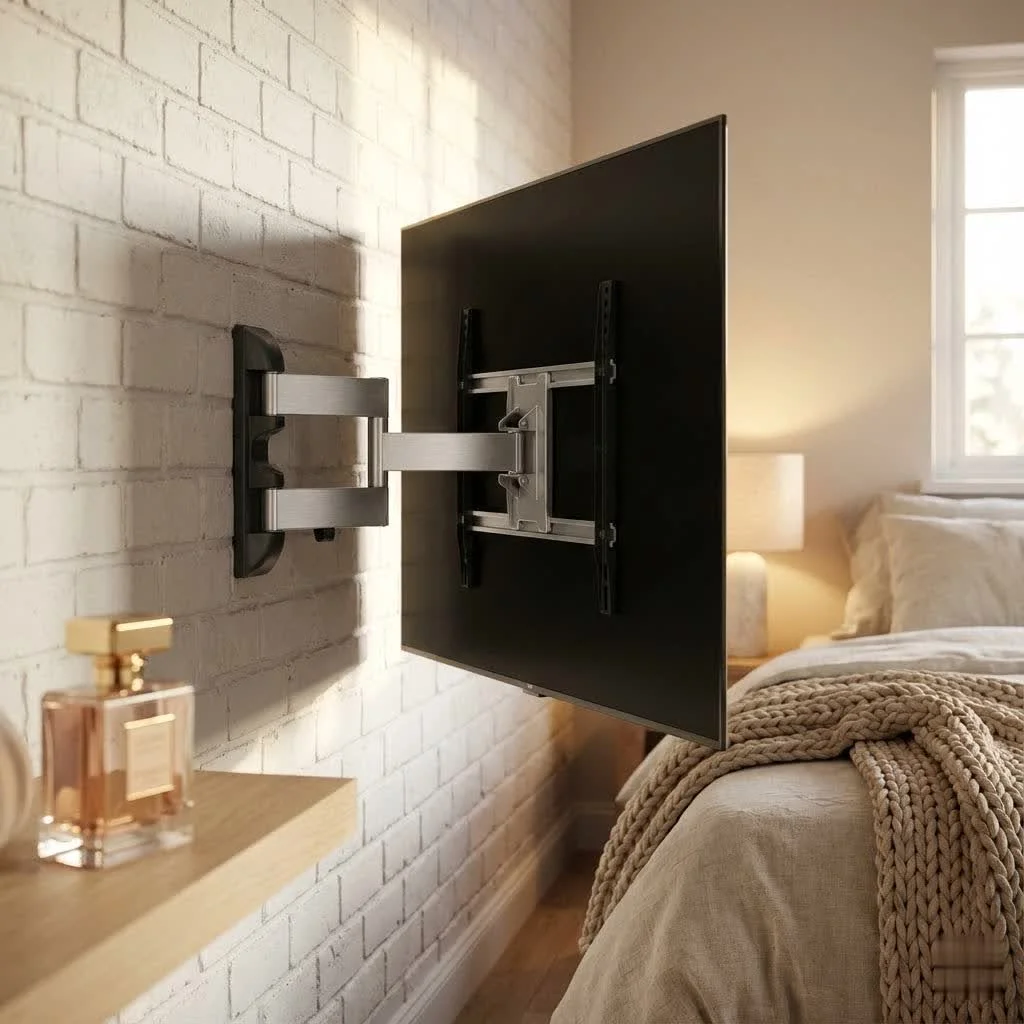
A universal TV mount is a versatile bracket designed to secure a wide range of television brands and models to a wall, primarily by adhering to the VESA (Video Electronics Standards Association) standard. These mounts accommodate various VESA patterns (e.g., 200x200mm, 400x400mm) and support specific TV sizes and weights, offering a flexible and often future-proof solution for home entertainment setups. They free up floor space, enhance viewing angles, and improve safety by preventing tip-overs.
What Exactly is a Universal TV Mount?
At its core, a universal TV mount is designed to be compatible with a wide range of television brands and models, rather than being specific to one manufacturer or TV size. The magic behind this versatility largely lies in the VESA (Video Electronics Standards Association) standard. VESA defines the distance between the four mounting holes on the back of your TV in millimeters (e.g., 200x200mm, 400x400mm, 600x400mm). A truly universal mount will support a broad spectrum of these VESA patterns, along with a significant range of TV sizes and weights.
While the term “universal” suggests one-size-fits-all, it’s more accurate to say these mounts are designed for broad compatibility. They won’t fit every single TV ever made, but they cover the vast majority of modern flat-panel displays, offering peace of mind if you upgrade your TV down the line.
Decoding the Options: Types of Universal TV Mounts
Choosing the right type of universal TV mount is crucial for maximizing your viewing pleasure and fitting seamlessly into your home’s aesthetic. Each style offers distinct advantages.
Fixed TV Mounts: The Streamlined Choice
Fixed mounts, also known as low-profile mounts, are the simplest and most budget-friendly option. They hold your TV securely against the wall, often just an inch or two away, creating a clean, picture-frame-like look.
- Pros: Minimalist design, closest to the wall, secure, easy to install.
- Cons: No adjustability once installed, can make accessing rear ports tricky.
- Ideal For: Rooms where the TV can be positioned at the perfect viewing height and angle from a consistent seating area, and glare isn’t an issue.
Tilting TV Mounts: Combatting Glare with Ease
Tilting mounts build upon the fixed design by allowing you to adjust the vertical angle of your TV, typically tilting downwards. This feature is a major upgrade for reducing glare from windows or overhead lighting.
- Pros: Reduces glare, improves viewing angles if the TV is mounted higher (e.g., above a fireplace), still relatively low-profile.
- Cons: Limited to vertical adjustment; no side-to-side movement.
- Ideal For:: Bedrooms (where you might watch from bed), living rooms with high mounting positions, or spaces prone to reflections.
Full-Motion (Articulating) TV Mounts: Ultimate Viewing Flexibility
|
Our Picks for the Best TV Mount in 2026
As an Amazon Associate I earn from qualifying purchases.
|
||
| Num | Product | Action |
|---|---|---|
| 1 | Magnetic Monitor Wall Mount for Steel Surfaces, Fits 13 to 34 Inch Screens, Holds up to 22 lbs, VESA 75/100 Compatible Wall Mount for Computer and TV Monitor, No-Drill Installation with All Screws |

|
| 2 | Perlegear Full Motion TV Wall Mount for Most 42–86 inch Flat Curved TVs up to 132 lbs, 12″/16″ Wood Studs, Bracket with Articulating Arms, Swivel, Tool-Free Tilt, Max VESA 600x400mm PGLF12 |
|
| 3 | monTEK Motorized Ceiling TV Mount for 43-86 Inch TVs, Heavy-Duty 121lbs (4X Load Tested), Off-Center VESA Compatible, Electric Flip Down with Remote/App/Voice Control, Fits Flat & Pitched Roof |
|
| 4 | Pipishell Full Motion TV Wall Mount for Echo Show 21/15 and 13-43 Inch Flat Curved Screen TVs & Monitors, Max VESA 200x200mm up to 44lbs, TV Mount Wall Bracket with Rotation Swivel Tilt Extension |
|
| 5 | Amazon Basics Full Motion Articulating TV Wall Mount, with Swivel and Tilt, for 26\" to 55\" TVs and Flat Panels up to 80 Lbs, VESA Compatible, Black |
|
| 6 | Mounting Dream TV Wall Mount for Most 37-75 Inch TVs, Universal Tilt TV Mount Fit 16\", 18\", 24\" Stud with Loading Capacity 132lbs, Max Vesa 600 x 400mm, Low Profile Flat Wall Mount TV Bracket |
|
| 7 | MOUNTUP Full Motion TV Wall Mount for Most 26-60 Inch TVs, Max VESA 400x400mm Wall Mount TV Bracket with Swivel Tilting Extension Level Adjustment for LED LCD Flat Curved TVs Up to 77 LBS, MU0018 |
|
| 8 | USX MOUNT Full Motion TV Wall Mount for Most 32-70 inch TVs up to 99 lbs, Wall Mount Bracket with Dual Articulating Arms, Swivel, Tilt, Max VESA 400x400mm, TV Mount Fits 12”/16” Wood Studs |
|
| 9 | Mounting Dream TV Wall Mount for 32-65 Inch Television,Mount with Swivel and Tilt, Full Motion Bracket with Articulating Dual Arms, Fits 16inch Studs, Max VESA 400X400 mm, 99lbs, MD2380 |
|
| 10 | USX Mount Full Motion TV Wall Mount for Most 42-90 inch Flat Screen/LED/4K, TV Mount Bracket Dual Swivel Articulating Tilt 6 Arms, Max 16\" Wood Studs, VESA 600x400mm, Holds up to 132lbs |
|
For those who crave maximum versatility, full-motion mounts are the answer. These mounts feature an extendable arm that allows you to pull the TV away from the wall, swivel it from side to side, and tilt it up or down.
- Pros: Optimal viewing from multiple angles, great for large rooms or open-plan living, ideal for corner mounting, easy access to rear TV ports for cable management.
- Cons: More complex installation, generally more expensive, can protrude further from the wall when retracted, requires more wall space.
- Ideal For: Multi-purpose rooms, kitchens, or any space where you need to adjust the viewing angle frequently or watch from various seating positions.
Choosing Your Perfect Universal TV Mount: A Step-by-Step Guide
Selecting the right universal TV mount isn’t just about finding one that “looks good.” It’s about ensuring safety, compatibility, and an optimal viewing experience.
Match Your TV’s Specs: Size, Weight, and VESA Pattern
This is the most critical step. Every universal TV mount has specific limits for screen size and weight, and a supported range of VESA patterns.
- Screen Size: While a mount might say “fits 32-80 inch TVs,” it’s a guideline. The most important factors are VESA and weight.
- Weight Capacity: Crucially, your chosen mount’s weight capacity must exceed the weight of your TV. Check your TV’s manual or the manufacturer’s website for its exact weight. Never compromise on this – safety is paramount!
- VESA Pattern: Locate the four threaded holes on the back of your TV. Measure the horizontal and vertical distance between them in millimeters. This is your TV’s VESA pattern (e.g., 400x200mm). Ensure your universal mount supports this specific pattern.
Assess Your Wall Type: Safety First!
The material of your wall dictates how you can safely mount your TV.
- Wood Stud Walls: The most common and secure option. You must anchor your mount directly into at least two wooden studs using lag bolts. This provides the necessary structural support for your TV’s weight.
- Concrete/Brick Walls: Extremely strong. You’ll need a hammer drill and specific masonry anchors (often provided with the mount or purchased separately).
- Drywall (without studs):): This is generally not recommended for mounting anything heavier than a small picture frame. Drywall alone cannot support the weight of a TV. While specialized heavy-duty drywall anchors exist, always aim for studs or concrete for maximum safety. If studs are unavailable and you must use drywall, consult a professional to ensure appropriate anchors are used for your TV’s weight.
Consider Your Viewing Environment: Angles and Aesthetics
Think about how you watch TV and where you want it.
- Viewing Height: The center of your TV screen should ideally be at eye-level when you are seated. Avoid mounting it too high, which can lead to neck strain.
- Room Layout: Do you have multiple seating areas? A full-motion mount provides flexibility. Is it a dedicated home theater? A fixed or tilting mount might suffice.
- Glare: If sunlight or indoor lighting often creates reflections, a tilting or full-motion mount will allow you to adjust the angle to minimize glare.
- Aesthetics: How close to the wall do you want your TV? Fixed mounts are the slimmest, while full-motion mounts will have a larger profile.
the Extras: Cable Management and Features
Modern mounts often include thoughtful features that enhance your setup.
- Cable Management: Many mounts include clips, channels, or a central column to route and conceal unsightly cables, contributing to a clean look.
- Leveling Adjustments: Some mounts allow for slight post-installation leveling adjustments, which is a lifesaver if your initial drill holes are slightly off.
- Quick Release Tabs: These make it easier to detach the TV from the wall for maintenance or moving.
DIY Installation: Mounting Your Universal TV Mount Like a Pro
Installing a universal TV mount can be a rewarding DIY project, but it requires precision and adherence to safety guidelines. Here’s a walkthrough from a pro’s perspective:
Your Essential Toolkit
Before you begin, gather these non-negotiable tools:
- Stud Finder: Electronic stud finders are a must to locate the wooden studs behind your drywall.
- Power Drill: For drilling pilot holes into studs and securing the wall plate.
- Level: A 24-inch or longer level ensures your mount is perfectly straight.
- Tape Measure: For precise height and centering measurements.
- Pencil: For marking drill spots and guidelines.
- Socket Wrench/Ratchet: For securely tightening lag bolts into studs.
- Painter’s Tape: Useful for marking and holding templates without damaging walls.
- Philips Head Screwdriver: For attaching brackets to your TV.
Step-by-Step Installation Process
- Plan Your Placement: Decide on the ideal height and horizontal centering for your TV. A good rule of thumb is to have the center of the screen at eye level when seated. Use painter’s tape to mock up the TV’s position on the wall.
- Locate and Mark Studs: Use your stud finder to pinpoint the exact center of at least two adjacent studs where your mount will sit. Mark these spots with a pencil. Most studs are 16 or 24 inches apart.
- Drill Pilot Holes: Hold the wall plate of your mount against the wall, centered horizontally over your marked studs, and use your level to ensure it’s perfectly straight. Mark the drill points through the mount’s holes. Then, using a drill bit slightly smaller than your lag bolts (check your mount’s instructions), drill straight pilot holes into the center of each marked stud.
- Secure the Wall Plate: Align the mount’s wall plate with your pilot holes and insert the lag bolts. Use your socket wrench to tighten them firmly into the studs. Do not overtighten, as this can strip the wood. The wall plate should be absolutely secure and unmoving.
- Attach Brackets to Your TV: Lay your TV face-down on a soft, clean surface (like a blanket on a table). Locate the VESA mounting holes. Attach the vertical mounting brackets from your kit to the back of your TV using the appropriate screws and spacers provided. Ensure these are hand-tightened securely.
- Hang and Secure Your TV: This step often requires a second person. Carefully lift your TV and hook its attached brackets onto the wall plate. Most mounts have a locking mechanism (clips, screws, or tabs) that secures the TV to prevent accidental dislodging. Engage this mechanism immediately.
- Make Final Adjustments: If you have a tilting or full-motion mount, adjust the tilt, swivel, or extension to your preferred viewing angle. Use your level one last time to ensure the TV is perfectly horizontal.
Pro Tips for a Flawless Finish
“In my 15 years in the field, I’ve seen countless installations,” says Ava Sterling, Dikfu.com’s lead content creator. “The beauty of a truly universal TV mount isn’t just its adaptability, but how it empowers homeowners to create a safe, optimized viewing experience tailored precisely to their space. Always a little extra time on planning and double-checking can prevent a lot of headaches later.”
- Read the Manual: Always follow the specific instructions provided with your universal TV mount.
- Don’t Rush: Take your time, especially during measuring and drilling.
- Cable Management is Key: Once the TV is mounted, route your cables neatly through the mount’s channels or use cable ties and covers to hide them for a truly professional look.
- Professional Help: For very large or heavy TVs, or if you’re unsure about your wall type, don’t hesitate to hire a professional installer. It’s an investment in safety and peace of mind.
The Unbeatable Benefits of a Universal TV Mount
Beyond just holding your TV, a universal mount offers a wealth of advantages that significantly enhance your home entertainment experience.
Maximized Space and Clean Aesthetics
By eliminating the need for bulky TV stands, a wall-mounted TV instantly frees up valuable floor space, making even small rooms feel larger and more open. This creates a streamlined, modern aesthetic that declutters your living area and turns your TV into a sleek focal point.
Enhanced Viewing Experience
Mounting your TV allows you to position it at the ideal height and angle for your primary seating area, reducing neck strain and improving comfort. With tilting or full-motion mounts, you can easily adjust the screen to eliminate glare from windows or lights, ensuring a perfect picture no matter the time of day or where you’re sitting.
Superior Safety and Stability
A properly installed universal TV mount provides an incredibly secure platform for your television. This drastically reduces the risk of accidental tip-overs, which is especially vital in homes with children or pets. Your expensive display is safely out of harm’s way, giving you one less thing to worry about.
Future-Proof Your Setup
The “universal” nature of these mounts means they are designed to accommodate various VESA patterns and weight ranges. This inherent adaptability offers a degree of future-proofing, potentially allowing you to use the same mount if you decide to upgrade to a newer TV of a similar size in the future.
Common Questions About Universal TV Mounts (FAQ)
Q: Can I install a universal TV mount on any wall?
A: Not all walls are suitable for TV mounting. You must anchor the mount into strong structural elements like wood studs (behind drywall) or solid concrete/brick. Drywall alone is generally insufficient for supporting a TV’s weight.
Q: What is the ideal height for mounting a TV?
A: The generally accepted ideal height is to have the center of your TV screen at eye level when you are comfortably seated. This typically places the bottom edge of the TV about 24-30 inches above the floor, though it can vary based on your specific furniture and viewing distance.
Q: How do I hide cables after mounting my TV?
A: There are several ways to conceal cables: using the mount’s built-in cable management, running cables through in-wall cable management kits (requiring cutting and repairing drywall), or using decorative on-wall cable covers.
Q: Do all universal TV mounts fit all TV brands?
A: While “universal” implies broad compatibility, it doesn’t mean all brands or all TVs. Universal mounts are compatible with TVs that adhere to the VESA mounting standard and fall within the mount’s specified size and weight limits. Always check your TV’s VESA pattern and weight against the mount’s specifications.
Q: When should I consider professional installation?
A: You should consider professional installation if you have a very large or heavy TV, if your wall material is complex (e.g., plaster, metal studs), if you’re unsure about locating studs, or if you want a complex setup like an in-wall power solution. Peace of mind and safety are worth the investment.
The Dikfu Edge: Elevating Your Home Entertainment
Choosing and installing a universal TV mount might seem like a daunting task, but with the right knowledge and tools, it’s a completely achievable project that transforms your home. At Dikfu.com, we believe that understanding the nuances of TV mounting empowers you to create the perfect home entertainment hub – one that’s safe, stylish, and incredibly functional. By following these expert guidelines, you’re not just hanging a TV; you’re crafting an experience. Dive in, get your tools ready, and unlock the full potential of your home viewing.
Install a Universal TV Mount
This guide provides step-by-step instructions for safely installing a universal TV mount, ensuring your television is securely attached to the wall for optimal viewing.
Decide on the ideal height and horizontal centering for your TV. The center of the screen should ideally be at eye level when seated. Use painter's tape to mock up the TV's position on the wall for visual confirmation.
Use an electronic stud finder to pinpoint the exact center of at least two adjacent wooden studs where your mount's wall plate will sit. Mark these spots with a pencil; most studs are 16 or 24 inches apart.
Hold the mount's wall plate against the wall, centered over your marked studs, and use a level to ensure it's straight. Mark the drill points, then use a power drill with a bit slightly smaller than your lag bolts to create pilot holes. Securely fasten the wall plate to the studs using lag bolts and a socket wrench, ensuring it is firm and unmoving.
Lay your TV face-down on a soft, clean surface. Locate the VESA mounting holes on the back of the TV. Attach the vertical mounting brackets from your kit to these holes using the appropriate screws and spacers provided, tightening them securely by hand.
With assistance, carefully lift your TV and hook its attached brackets onto the wall plate. Engage the mount's locking mechanism (clips, screws, or tabs) immediately to prevent accidental dislodging. Make any final tilt, swivel, or extension adjustments, and use a level to ensure the TV is perfectly horizontal.
Get our weekly buyer guide
Practical specs, not advice. Unsubscribe anytime.

I was so confused about VESA patterns before reading this. My new 65-inch Samsung has a 400x400mm pattern, and finding a mount that explicitly stated compatibility was a relief. The installation was straightforward, and it really does free up so much space in my living room. Highly recommend going with a universal option.
This guide helped me pick out a great universal mount for my new apartment. I appreciated the emphasis on checking the weight capacity, as my older plasma TV is quite heavy. It feels super secure on the wall, and I love being able to tilt it for better viewing from my couch. Definitely a solid investment.
I got a universal mount for my bedroom TV, a smaller 32-inch model. While it works and adheres to the VESA standard, the included hardware wasn’t quite long enough for my specific wall studs, so I had to make a quick trip to the hardware store. It’s up now and looks good, but that extra step was a bit annoying.
Finally got around to mounting my TV after years of it sitting on a stand. The universal mount I chose, based on the VESA compatibility info, was perfect for my 55-inch LG. It feels incredibly sturdy, and I’m no longer worried about tip-overs with my kids and pets around. Great solution for home entertainment.